Government Agencies Case Study for Document Management Solution

Government agencies manage large volumes of information every day. Public records, permits, applications, policies, contracts, correspondence, personnel documents, procurement records, and administrative files all need to be organized, accessed, secured, and retained.
When those records are distributed across paper files, shared folders, individual computers, and email inboxes, even routine requests can require considerable manual effort.
A document management system for government agencies provides a structured way to capture, organize, search, secure, process, and retain government documents and records.
The goal is not simply to replace paper with digital files. It is to create a more controlled information environment in which authorized staff can find the information they need, manage documents consistently, and maintain appropriate records throughout their lifecycle.
What Is Document Management for Government Agencies?
Document management for government agencies is the process of capturing, organizing, storing, securing, retrieving, processing, and retaining documents and records created or received during government operations.
A government document management system provides a centralized repository while adding capabilities such as:
- Document profiles and metadata
- Search and retrieval
- Access permissions
- Version control
- Audit trails
- Workflow automation
- Records retention
- Scanning and document capture
- Email management
- Backup and recovery
These capabilities allow agencies to move beyond basic file storage and establish more consistent document-management processes.
For a broader explanation of how a DMS works, see What Is a Document Management System?.
Why Do Government Agencies Need Document Management?
Government organizations face a combination of high document volumes, multiple departments, sensitive information, procedural requirements, and long-term records-management needs.
The challenges are not limited to paper.
Digital files can also become difficult to manage when they are distributed across shared drives, individual computers, email accounts, and departmental repositories.
Common challenges include:
- Large Volumes of Records
Government agencies may create and receive documents relating to public services, policies, permits, contracts, procurement, correspondence, personnel, and other administrative activities.
As volumes increase, finding a specific document becomes more difficult without a consistent classification and indexing structure.
- Sensitive Information
Government records can contain information that should only be available to authorized employees or departments.
A document-management system can apply user and group permissions to control access to information.
- Paper-Based Records
Many agencies still have historical or operational records that originated on paper.
Without a structured digitization process, staff may have to search physical files before information can be retrieved or shared.
- Document Routing and Approvals
Government processes frequently involve multiple people and departments.
A document may need to be reviewed, revised, approved, signed, or forwarded before a process can be completed.
Managing these handoffs manually can make it difficult to track progress.
- Records Retention
Government records may need to be retained for defined periods according to applicable laws, regulations, policies, or retention schedules.
A records-management system can help organizations classify records, apply retention rules, and manage their lifecycle.
Common Government Document Management Use Cases
A government DMS is not limited to one department. Different agencies can use document management for different processes.
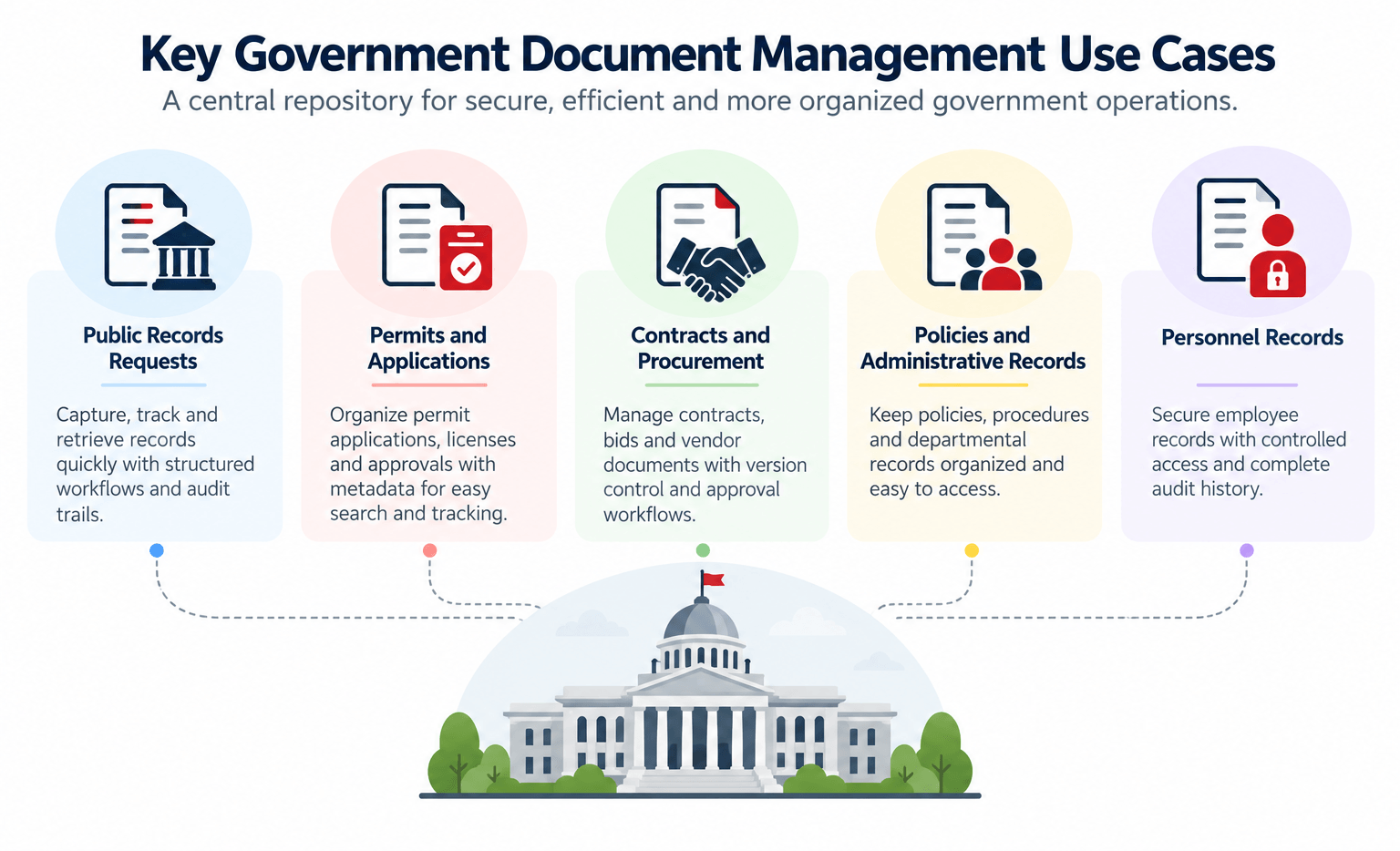
- Public Records and Information Requests
Public records requests can require staff to locate information across departments and repositories.
A centralized document repository combined with metadata and search can make it easier for authorized personnel to locate relevant records.
Workflow can also be used to route requests for review and approval.
Docsvault’s Government Document Management solution specifically describes using Web eForms and workflow to digitize public-record requests and route them through required steps.
- Permits and Applications
Government agencies process many types of permits and applications.
Examples include:
- Building permits
- Business licenses
- Planning applications
- Election-related permits
- Public-service applications
- Environmental permits
Documents can be indexed using relevant information such as applicant, location, document type, date, or status.
This makes it easier for authorized staff to locate documents without manually searching through paper files or folders.
- Contracts and Procurement
Procurement departments manage contracts, bids, purchase documentation, vendor correspondence, and related records.
A DMS can provide a central location for these documents while supporting:
- Document classification
- Search
- Version history
- Approval workflows
- Access control
- Retention
This is particularly useful when multiple departments participate in the procurement process.
- Policies and Administrative Records
Government organizations continually create and update policies, procedures, forms, and administrative documents.
Version control helps distinguish current documents from earlier revisions, while permissions and workflow can support controlled review and approval.
- Personnel Records
Government agencies also manage employee-related documentation.
Depending on the agency’s policies and access requirements, documents can be organized and secured according to department, employee, document type, or other metadata.
- Department and Interdepartmental Records
Government decisions frequently require information to move between departments.
A centralized repository can reduce dependence on sending multiple copies of documents by email or storing separate versions in different locations.
Users can work from the controlled repository while permissions determine which documents they can access.
How Does a Government Document Management System Work?
A practical government document-management process can follow a sequence such as:
Capture → Classify → Store → Search → Process → Secure → Retain
Capture
Documents can enter the system through scanning, importing, electronic forms, email, or digital creation.
Classify
Documents are organized using folders, document profiles, index fields, and metadata.
Store
Documents are maintained in a centralized repository rather than being scattered across individual storage locations.
Search
Users can retrieve information using document metadata and search capabilities.
Process
Workflow can route documents for review, approval, notification, or other defined steps.
Secure
Permissions and access controls help restrict documents to authorized users.
Retain
Records can be managed according to applicable retention policies and schedules.
This lifecycle approach is more useful than thinking of document management simply as digital storage.
What Should Government Agencies Look for in a DMS?
Not every document-management system provides the same capabilities.
When evaluating a solution, government agencies should consider the following.
Centralized document repository
Can the organization establish a controlled location for documents and records?
Metadata and document profiling
Can documents be classified using information such as department, document type, date, applicant, permit, or status?
Search and retrieval
Can users search by metadata as well as document content?
Access control
Can access be restricted according to users, groups, departments, or other defined permissions?
Version control
Can users distinguish current documents from previous versions and maintain revision history?
Audit trails
Can the organization see document-related activity and maintain a history of actions?
Workflow automation
Can documents be routed through defined review and approval processes?
Records retention
Can the system support retention schedules and document lifecycle management?
Scanning and OCR
Can paper records be digitized and, where applicable, made searchable?
Email management
Can important government correspondence be captured and managed alongside related documents?
Backup and recovery
Can the organization protect its repository against accidental loss, system failure, or other disruptions?
Moving From Paper Records to Digital Government Records
Digitization is often the first step for agencies with large paper archives.
However, scanning documents alone does not solve the underlying information-management problem.
A scanned document still needs to be:
- Captured
- Classified
- Indexed
- Stored securely
- Searchable
- Accessible to authorized users
- Managed through its lifecycle
Docsvault’s physical records guidance similarly emphasizes identifying records, establishing a filing strategy, converting physical records into digital data, and applying retention and disposal schedules.
For agencies with significant physical archives, this makes records management and document digitization complementary activities, rather than separate projects.
How Workflow Automation Supports Government Document Processes
Government document processes often involve repetitive handoffs.
For example:
Request received → Review → Department verification → Approval → Response → Record retention
When these steps depend entirely on email and manual follow-up, it can be difficult to know where a request currently stands.
Document workflow automation can route documents according to predefined rules, assign tasks, send notifications, and track progress.
Docsvault’s workflow guide covers document routing, review, approval, notifications, and automated actions.
For government-specific compliance and records-management workflows, see Workflow Automation for Regulatory Compliance.
Managing Government Records Through Their Lifecycle
Document management and records management overlap, but they are not exactly the same.
Document management focuses on capturing, organizing, finding, securing, and working with documents.
Records management focuses on managing records through their required lifecycle, including retention and disposition.
Government agencies may need both.
A records-management strategy can establish:
- Which documents qualify as records
- How records are classified
- How long different records are retained
- When records can be disposed of
- Who can authorize disposition
- How records are placed on hold when required
Docsvault’s records-management guidance describes retention schedules, disposition approvals, physical and electronic records, activity logging, and legal holds.
How Docsvault Supports Government Document Management
Docsvault provides a document management platform that can be deployed on-premise or in a customer-hosted private cloud, giving organizations control over where their document repository is hosted.
For government organizations, relevant capabilities include:
- Centralized document repository
- Document Profiles and metadata
- Full-text and metadata search
- Scanning and document capture
- User and group permissions
- Version control
- Audit trails
- Workflow automation
- Web eForms
- Records retention
- Email management
- Backup and recovery
Docsvault’s dedicated Government Document Management solution describes these capabilities in the context of public records, document search, workflow, version control, access control, and audit trails.
Explore the Government Document Management Solution
For the commercial overview, capabilities, and government-specific positioning, see: Government Document Management Solution
Real-World Government Document Management
The difference between a hypothetical example and a real implementation is important.
Docsvault’s current government content includes a real-world example involving a U.S. Supervisor of Elections Office and permit management. The case describes digitizing permits, indexing them for search, and using workflows for processing.
This is a better place to demonstrate actual implementation experience than maintaining the old fictional case-study format of this article.
Read the Government Document Management article for the detailed use case:
Digital Records Management for Government Agencies
Government Document Management vs. Basic File Storage
A shared folder can store documents, but storage alone does not necessarily provide the controls required for a document-heavy government environment.
| Capability | Basic File Storage | Document Management System |
| Centralized storage | ✓ | ✓ |
| Structured metadata | Limited | ✓ |
| Full-text document search | Limited | ✓ |
| Version history | Limited | ✓ |
| Access controls | Basic | ✓ |
| Audit trail | Usually limited | ✓ |
| Workflow | No | ✓ |
| Records retention | No | ✓ |
| Document lifecycle management | Limited | ✓ |
| Scanning and capture | Separate tools may be required | ✓ |
The exact capabilities vary by platform, so agencies should evaluate solutions against their own document, records, security, and workflow requirements.
How to Evaluate a Government Document Management System
Before selecting a DMS, government agencies should map their existing information environment.
Ask:
Where are records stored today?
Identify paper archives, shared drives, local computers, email, and departmental repositories.
What information must users search for?
Identify the metadata and document attributes that staff use when retrieving records.
Which records require restricted access?
Map departments, roles, users, and sensitive information.
Which processes require review or approval?
Identify permits, applications, procurement documents, policies, contracts, and other documents that move through defined processes.
How are retention schedules managed?
Document the applicable policies and retention requirements before configuring the system.
What needs to be digitized?
Determine the volume of paper records and whether scanning and OCR are required.
How will the system fit existing technology?
Consider Microsoft Office, Outlook, Active Directory, web access, mobile access, and other systems used by the agency.
From Paper Management to Information Management
Government document management is ultimately about more than reducing paper.
A well-designed system gives agencies a structured way to:
Capture information → organize it → find it → control it → process it → retain it
That can make day-to-day document handling more consistent while giving authorized employees better access to the information they need.
For organizations evaluating a government document management system, the best starting point is to understand the agency’s document flows, access requirements, records obligations, and operational processes before selecting technology.