Navigation:  Getting Started >

Task Management

Print this Topic Previous pageReturn to topNext page

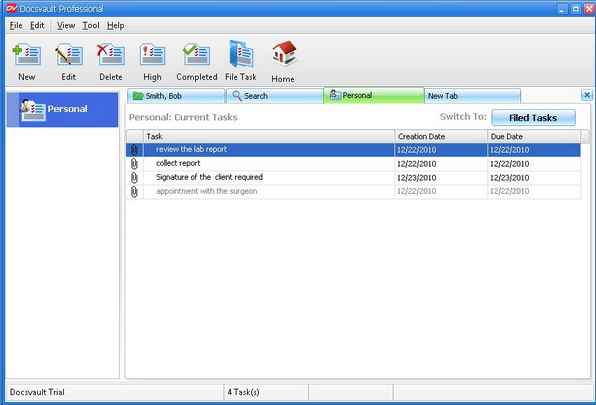
Task Manager Window helps you to see and manage all your personal tasks.


On the Tools menu, click on Tasks  

                Or

  From the toolbar, click on Task icon


This will open the Task Manager in a new tab as shown below:


Task Manager Window


The task manager is split into two panels:


To the left is 'Task  panel'


To the right is 'Task list panel'  will display the log of the activities that have been completed or still in progress for your Personal Task category. You can also double click a task in the Display panel. The task will open in a new window called the Task Properties. You can view the progress of the task and also set the next course of actions such as: task recurring pattern or mark it as completed. You can even set a task reminder.


Page url: http://www.docsvault.com/online-help/professional/index.html?viewing_task_management.html