|
Document Tasks |

  
|
|
Document Tasks |
|
|
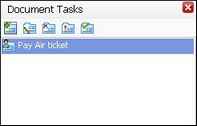
You can view Personal tasks related to the document in Document Tasks panel on the right panel of Docsvault Explorer.
Document Tasks Panel allows you to create, assign, edit, delete a task and change its priority according to its importance. Tasks can also be marked done once it has been completed.
Tasks Manager allows you to do the following:
Following are the operations that you can perform on Personal Task:
Creating a new task Click on the New Task icon to task out or add a personal task.
Editing a task An existing task in the 'Task Panel' can be modified by clicking on the Edit icon from the toolbar.
Setting high priority for a task Select a task from the 'Document Tasks Panel', from the toolbar click on High icon to set it at 'High Priority'.
Changing task from high priority to normal priority Select a task from the 'Task Panel'; from the toolbar click on Normal icon to set it at 'Normal Priority'.
Deleting a task
Mark a task as Complete A task once accomplished can be marked Complete by clicking on Complete icon from the toolbar after selecting the task from the task list. This will mark the task grey and shift it to the bottom of the "task list".
Mark a task as Pending In case you have marked an unaccomplished task as Complete, it can be changed back to Pending status. For this first select the concerned task from the "task list" and click on Pending icon.
Page url: http://www.docsvault.com/online-help/professional/index.html?viewing_tasks.html |