Indexing Options
Your Operating System's indexing engine service can be used for full text search within Docsvault. In case this service is not installed on your machine, Docsvault will offer you a choice to download and install this OS search component automatically during the first time server configuration. This feature in not essential for Docsvault's operation but is recommended as it will enable all Docsvault users to search for text even within files.
 Full text search for standard PDF and OCRed PDF files Full text search for standard PDF and OCRed PDF files
You need PDF iFilters for the indexing service to index PDF files. On any 32 bits OS, installing the free Adobe Reader 9.0 + on the machine. This will install the proper iFilters necessary. For 64 bits OS, please install the 'Adobe PDF iFilter 9 for 64-bit platforms' available freely from Adobe's website. At the time of this writing the 64 bits iFilter is available here.
|
All Windows OS have iFilters for Microsoft Office applications such as Word, Excel etc and most other text based file formats installed by default. To have a full text indexing on a file with specific extension you need to have it's corresponding IFilter component installed on the machine where Docsvault Server is installed. For more information please refer:
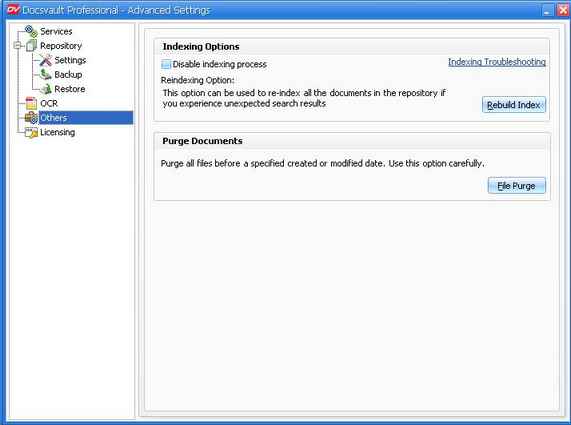
Option: Disable index process
This section allows you to configure the Docsvault indexing service.
To start using Indexing Service:
| • | Enable the Indexing Service by making sure that the check box is Unselected for the option 'Disable index process'. |
 Note: Note:
| • | Docsvault will prompt to download and install the Operating Service's search component if it is not installed already. |
|
To Stop Indexing Files in Docsvault:
| • | Select the checkbox next to the option 'Disable index process'. |
Use this option to prevent Docsvault from indexing the contents of files that are imported into Docsvault. This option will stop indexing new files and will erase all the previous indexes for the documents imported into Docsvault.
 Warning: Warning:
| • | If this check box is enabled, Docsvault will not be able to search for any documents imported into Docsvault based on their content. |
|
|