Navigation:  Docsvault Features > Docsvault PDF Editor > Working with Annotation >

Highlighting Text

Print this Topic Previous pageReturn to topNext page

Highlighting Text

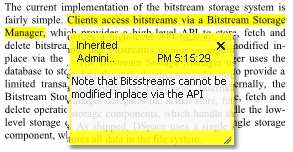
Docsvault PDF Editor enables you to browse the document and navigate to the text to annotate. Here, the user has selected the highlight the important text and then add messages to it.


To highlight the text

Select the Highlight annotation tool by either selecting the Highlight toolbar button or choose Tools > Highlight.
With the cursor, click and drag to select the text
Select the Hand tool from the toolbar
To open the pop-up note, double-click on the highlighted text
Type your message into the note.


Highlight Text


To delete the highlight


Select the Edit Object tool from the toolbar.
Click on the highlighted text.
When selected, a blue box will appear around it.
Press the delete key to remove the highlight.


Page url: http://www.docsvault.com/online-help/professional/index.html?highlighting_text.html