AI Capture extracts data from PDF documents during the import process for configured profiles. The captured values are automatically populated into profile index fields based on the configured AI Capture settings.
AI Capture runs when importing a PDF document into Docsvault or when Scanning a document in Docsvault scanning interface. Depending on the execution mode of the AI job, the extraction can begin automatically or when the user clicks the blue  AI icon.
How AI Capture Works
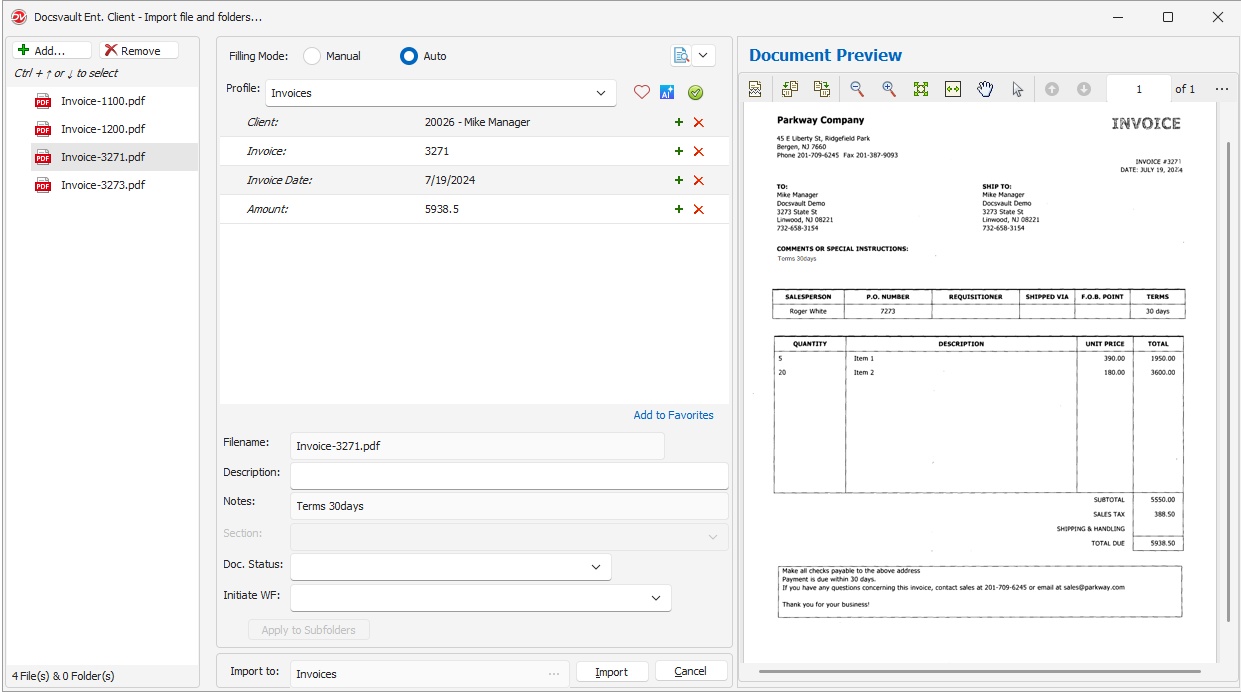 AI Capture Import |
•Select the location where you want to import the documents
•Add PDF files using Import Docs or drag and drop files into a folder.
•If Automatically execution mode is enabled in AI Capture, AI Capture procedure will run automatically.
•The extracted values are populated into the corresponding index fields.
•Review the captured values.
•Click Import to save the document.
Manual Execution
If Manual execution mode is enabled in AI Capture, click the AI button to execute AI Capture.
Additional Fields
Values captured using Additional Fields are not mapped to index fields but can be used in:
•Filename
•Description
•Document Notes
•Dynamic Filing Location
In the example shown, AI Capture extracts Comments and automatically populates the Notes field.
These values are inserted based on the configured Dynamic Filing Template.
•If AI Capture does not process as expected, review the AI Tools log file for details. •AI Capture works with PDF documents only •AI Capture runs during import •Captured values can be edited before importing •Manual execution requires clicking the AI button |
