Additional Fields allow you to capture extra values from documents that are not mapped to existing profile index fields. These fields can be used for filenames, descriptions, notes, or other processing without storing the value in Docsvault index fields.
When to Use Additional Fields
Use Additional Fields when you want to:
•Capture values for filename generation
•Populate document description
•Populate notes
Example:
•Capture Invoice Type to use in filename
•Capture Vendor Code for description
•Capture Reference Number for notes
Add Additional Field
•Click + next to Additional Fields
•Select field type. Additional Fields support the same types as index fields:
oText - Capture alphanumeric values
oList - Match against predefined values
oDate - Extract date values
oNumeric - Capture numbers
•Enter Name
•Configure capture settings
•Click Save
All configuration options behave the same as standard index fields.
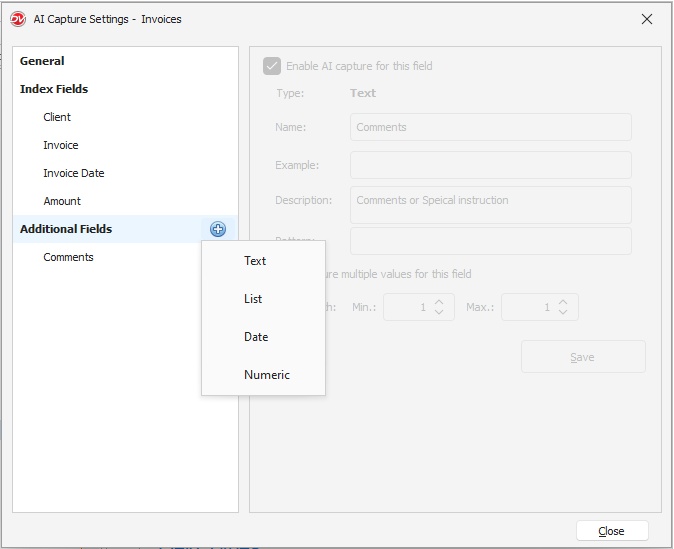 AI Capture Additional Fields |
Using Additional Fields in Filing Template
Values captured using Additional Fields can be used in Filing Templates. These fields are useful when extracted values are required in filenames, descriptions, or document notes without storing them as index values.
After configuring an Additional Field in AI Capture Settings, the captured value becomes available under Dynamic Values > Add. AI Fields in the Filing Template.
Example - Using Additional Field in Document Notes
If you create an Additional Field named Comments, and AI Capture extracts the comments from the document, you can include it in Document Notes as in the screenshot below:
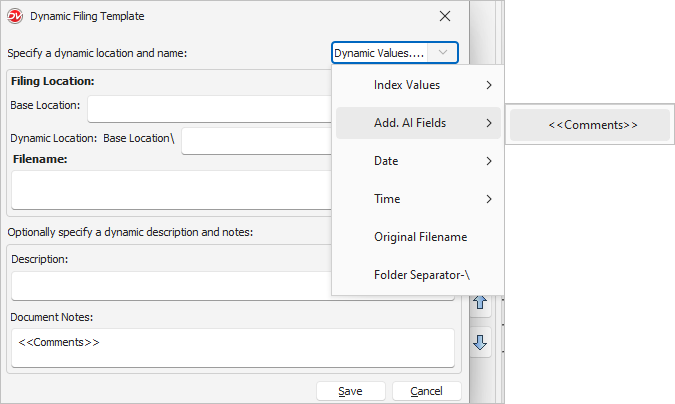 |
When the document is imported, the captured value is automatically inserted into the document notes.
Example Usage:
Filename: Invoice_<<Invoice#>>_<<Comments>>
Description: Captured comment: <<Comments>>
This allows AI-captured values to be dynamically applied during import without creating additional index fields.
Important Notes
•Additional fields are not stored as index values
•Used only during AI Capture processing
•Can be referenced in filename, description, and notes in Filing Template
•Can be deleted without affecting profile structure