You can use the event Audit Template to log details about user actions. For example you can configure the template such that whenever a document is deleted or exports; assign or clear document status, details about the action are logged. Details logged include the name of the user performing the action along with the date and time of the action.
Docsvault provides defaulted settings to make monitoring setup as easy as possible. Administrators or the user with the adequate rights can also use these preset Audit Template and add or delete the events to create custom Audit template sets.
Creating an Audit Template
•Select the Administration menu and click the Audit Template option.
•Click New button to add a Audit Template.
•In the Audit Template, enter a name and description for the new Audit template.
•Select the events to be recorded by checking the corresponding check boxes.
•In order to restrict the other user with the adequate rights to modify the template, select the checkbox next to 'Prevent edits by other template users '
•Click the Save button to save the set of selected members in a Audit Template. The Audit Template will now be listed in the Audit Template drop-down.
For example: To monitor all that activities to ensure that documents are not taken out of the organization without adequate permission. The Administrator can set the Audit Template by selecting the events as shown in the following image.
|
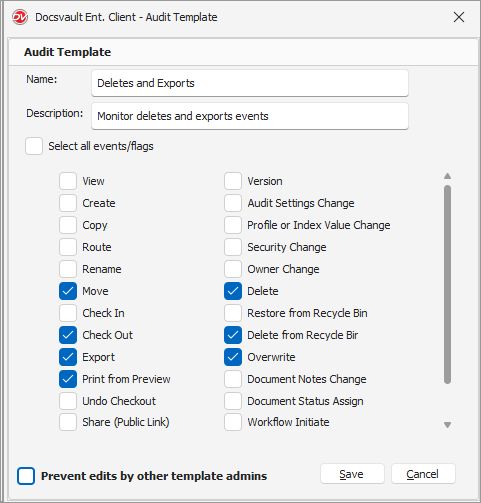 Audit Template |
•To edit a Audit Template, click the Edit button in the Audit Template list.
•To delete a Audit Template, click the Delete button in the Audit Template list.
•‘Permanent Delete’ events will always be logged, regardless of the audit settings.
|

Default Audit Template:
The system's default "Track Movement" audit template records essential information about file movement and deletion events. This includes actions such as creating, moving, exporting, undoing checkouts, modifying profiles or index values, changing security settings, deleting, restoring, deleting from the recycle bin, and overwriting. All cabinets will automatically have the "Track Movement" audit template enabled.
Applying a Audit Template
To learn how to use Audit Templates with a file, see Setting Audit Trail on individual document.