Worldox Alternative for Law Firms: Why Docsvault Is a Practical Replacement
Looking for a Worldox replacement that keeps your data on-premise?
Law firms searching for a Worldox alternative are often looking for a solution that preserves on-premise control while addressing modern requirements around document search, compliance, and matter-centric organization.
Docsvault is a modern document management platform built for law firms that want greater control, predictable costs, and familiar workflows, without being forced into a cloud-only model.
See how Docsvault supports law firms planning their next step beyond Worldox.
Migration planning and on-premise deployment options available.
Why Law Firms Are Considering Worldox Alternatives
Worldox (now part of NetDocuments) has undergone a significant shift in direction following NetDocuments’ acquisition of Worldox. Since the acquisition, development focus has moved toward NetDocuments’ cloud-native platform, and the long-standing Worldox on-premise desktop product is no longer positioned for continued innovation.
Worldox Cloud support ended in late 2023, and on-premise support ending Dec 2026, many firms are reassessing long-term certainty around product direction, support timelines, and deployment flexibility. For law firms that prioritize control, compliance, and predictable operating costs, this shift has become an important factor in evaluating alternatives.
Why Docsvault Is a Practical Worldox Alternative
Docsvault is designed to be a document management solution that feels familiar to Worldox users while offering modern capabilities that align with current legal workflow needs.
Quick Comparison: Worldox vs Docsvault
| Feature | Worldox | Docsvault |
|---|---|---|
| Status | Legacy. Support is scheduled to end Dec 31, 2026. | Active. Frequent updates and new feature rollouts. |
| Deployment | Traditionally on-premise (legacy) — cloud strategy shifted toward NetDocuments after acquisition | On-premise deployment and private cloud-hosting with windows environment. |
| Client – Matter Hierarchy | Profile-based structure (Client, Matter, Doc Type, etc.) | Native client–matter folder structure with Profile-based structure support for Client & Matter |
| Integration with Outlook/Office | Good | Tightly integrated with MS Office and Outlook |
| PDF Tools | Depends on third-party tools | Built-in PDF editor for editing, redaction, Bates numbering, and annotation suite. |
| Search capabilities | Full-text search, separate server-based process for indexing | SQL-based full-text indexing with no separate indexer server, plus advanced proximity and inflection search. |
| Compliance & Security | Standard security features and access control | Role-based permissions, audit trails, compliance policies, encryption in transit |
| Migration | Forced to moved to cloud after NetDocuments acquisition | End-to-end Worldox migration preserving client–matter architecture on-premise |
How Docsvault Compares: Key Functional Capabilities
Client and Matter Documents
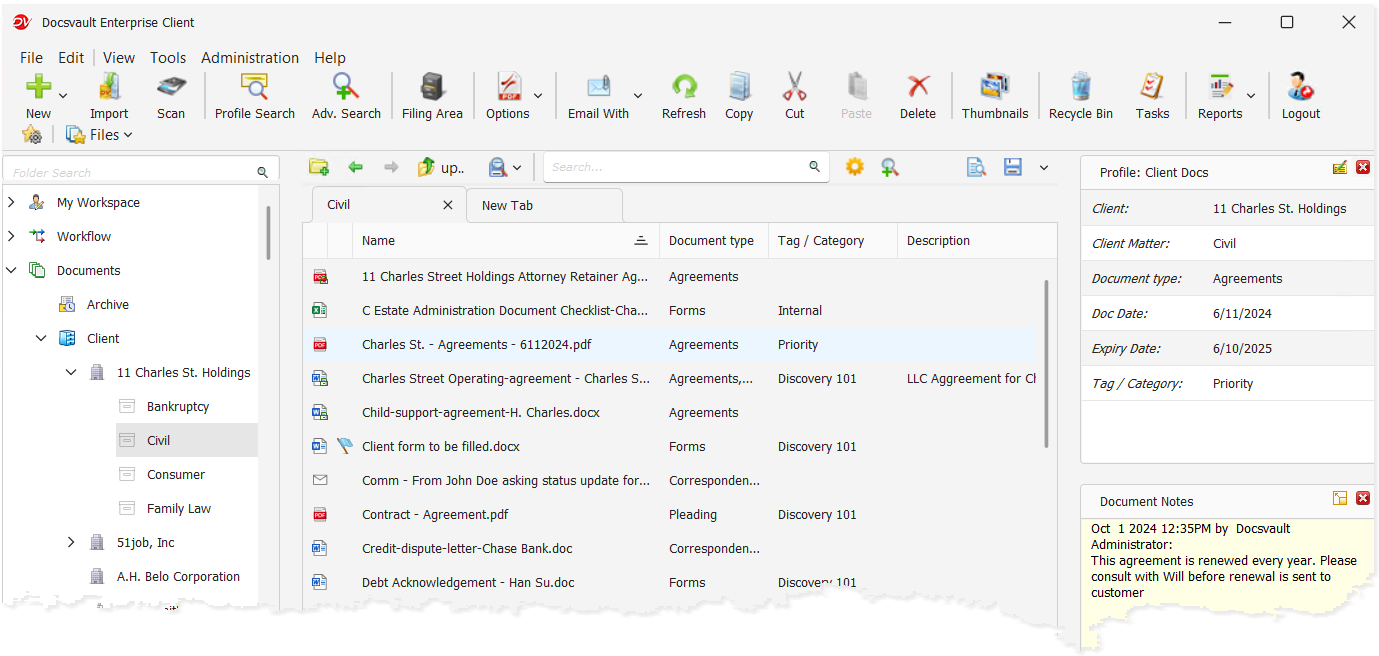
Docsvault organizes documents by client and matter, not just folders, so files, emails, and associated records are consistently grouped and easier to retrieve.
Read: Explore how matter-centric organization works
Advanced Email Management
Docsvault integrates seamlessly with Microsoft Outlook to capture emails and attachments directly into the appropriate matter. This prevents duplicate filing and enables full-text search across email content and attachments.
Read: Email Management for Law Firms
Deep Microsoft Office Integration
Save documents directly from Word, Excel, and PowerPoint into Docsvault without disrupting daily workflows. Built-in version control and automated footer stamping for Word and Excel support accuracy, consistency, and compliance.
All-in-One PDF Solution
Eliminate the need for multiple PDF tools with a fully integrated solution. Edit, annotate, redact, apply Bates numbering, generate PDF and PDF/A copies, and save directly from Adobe Acrobat into Docsvault for court-ready documents.
Strong Search, Indexing, and Findability
Docsvault provides powerful tools for finding documents:
- Search using metadata, titles, comments, or full-text content
- Locate information within scanned documents using OCR
- Apply proximity search for faster, more precise results
- Leverage intelligent indexing across repositories
These capabilities help lawyers find files faster and with greater context.
Read: Legal File Search with Docsvault
Version Control & Document Comparison
Docsvault maintains complete version histories and allows users to compare documents to track changes accurately – supporting confidence in contracts, agreements, and legal filings.
Compliance and Records Retention
Apply configurable retention policies to meet legal, regulatory, and industry requirements while supporting defensible document retention and eDiscovery readiness.
Read: Compliance and retention guidance
Enhanced Collaboration
Enable secure,centralized collaboration across departments, reducing information silos and improving productivity.
Workflow Automation
Automate document-centric processes to reduce manual effort, minimize errors, and improve efficiency across legal and business operations.
Read: How Legal Departments Can Benefit from Contract Workflow Automation
Flexible Data Ownership & Deployment Options
Not all firms are ready for a full cloud transition, and many have legitimate reasons for maintaining control over their data and infrastructure.
Docsvault supports:
On-Premise Deployment
Firms that require local control due to compliance, regulatory, or internal IT policies can deploy Docsvault on-premise.
Read: Why law firms prefer on-premise document management
Secure Remote Access
Organizations that need complete on-premise data control with secure access through desktop, web, and mobile interfaces.
Read: On-Premise Legal DMS with Secure Access
This flexibility helps firms:
- Control costs
- Meet compliance requirements
- Support remote work without surrendering on-premise control
Deploy quickly with an intuitive interface and familiar tools, allowing teams to transition smoothly without extensive training or disruption.
Migration Reassurance: Plan With Confidence
Migrating from a legacy system like Worldox can feel daunting but with our structured approach, it can be smooth .
Preserve Matter Structures
Docsvault can map existing Worldox client and matter codes (and old Worldox Doc IDs if desired), keeping your organizational logic intact.
Maintain Searchability After Migration
Docsvault’s indexing tools help ensure that documents remain searchable and contextually retrievable after migration.
Reduce Disruption with Familiar Workflows
Docsvault’s user experience is designed for legal professionals, helping reduce training friction and speed adoption.
Real-World Example: Worldox Migration for a Law Firm
When Edwards Craver, a U.S.-based law firm, began evaluating alternatives to Worldox, their priority was clear: retain their familiar client–matter structure while modernizing search, compliance, and deployment flexibility.
Rather than moving to a cloud-only model, the firm selected Docsvault for its ability to deliver:
- Matter-centric organization aligned with existing workflows
- Seamless Microsoft Outlook and Office integration
- Powerful indexing and full-text search across documents and email
- On-premise deployment with secure remote access
- Predictable, cost-controlled licensing
Docsvault enabled a structured migration that preserved client and matter hierarchies, maintained document integrity, and minimized user disruption. The transition allowed the firm to modernize its document management environment without compromising control or operational continuity.
Read the full case study: Worldox Alternative for Edwards Craver
Where to Go Next
If your law firm is evaluating alternatives to Worldox, here are the key evaluation steps to guide your decision:
- Assess your current pain points
Consider search, email, compliance, and hybrid access needs - Review internal document workflows
Identify where delays or errors most commonly occur - Compare requirements against available options
Prioritize capabilities like indexing, compliance logs, and matter organization, and of course, smooth transition and familiar workflow. - Evaluate migration readiness
Consider data mapping, user onboarding, and continuity planning
For a comprehensive perspective on core capabilities modern legal teams need, start with our foundational guide:
Worldox Alternatives – Frequently Asked Questions
Yes. Docsvault offers similar matter-centric organization and enhances it with better search, email management, compliance tools and remote access.
Docsvault supports full on-premise deployment with optional secured access via web and mobile clients and private cloud-hosting with windows environment.
Docsvault is designed for law firms that need secure, organized, and compliant document management. It offers meta-driven filing and retrieval, AI-powered data capture, document comparison for Word, and Excel, and tight Microsoft Office and Outlook integration — helping firms maintain control over confidential information while improving productivity.
Yes — Docsvault offers a comprehensive migration process that ensures a smooth transition from Worldox to Docsvault while preserving your valuable data and metadata:
- Structure preservation: The migration process maintains the original document structure and hierarchy, ensuring that your data is organized in a familiar manner within Docsvault.
- Metadata mapping: : Docsvault’s migration process allows for precise mapping of your existing DMS metadata fields to corresponding fields in Docsvault, preserving the essential information associated with your documents.
Our team will guide you through a smooth migration to Docsvault, ensuring a seamless transition. Docsvault’s migration team can assist in planning and executing a smooth migration process tailored to your business requirements.
This article covers:
- Looking for a Worldox replacement that keeps your data on-premise?
- Why Law Firms Are Considering Worldox Alternatives
- Why Docsvault Is a Practical Worldox Alternative
- Quick Comparison: Worldox vs Docsvault
- How Docsvault Compares: Key Functional Capabilities
- Migration Reassurance: Plan With Confidence
- Real-World Example: Worldox Migration for a Law Firm
- Where to Go Next
- Worldox Alternatives – Frequently Asked Questions