Docsvault allows you to set custom index fields and enter index values when creating a folder or uploading a document for easy categorization, search and retrieval.
When you upload a document to Docsvault you have an opportunity to select a profile for that document. Once you have selected the appropriate profile, you would want to enter additional information about the document
Assigning Profile and indexes.
You can assign profile and multiple index values to documents as well as to folders
Assigning profile while uploading documents
You can assign a profile to the documents in the Upload dialog, which is displayed when documents are uploaded into Docsvault
•Select the Profile from the list. The fields will change depending on the profile you select
•Fill in values to the corresponding index. You can add multiple values for a index by clicking on the plus sign.
•All fields marked with icon  indicate that those fields are mandatory and must be filled in
•Apply To All Uploads will apply the indexes values to all the documents being uploaded in this batch
•Click the Upload button to start uploading files
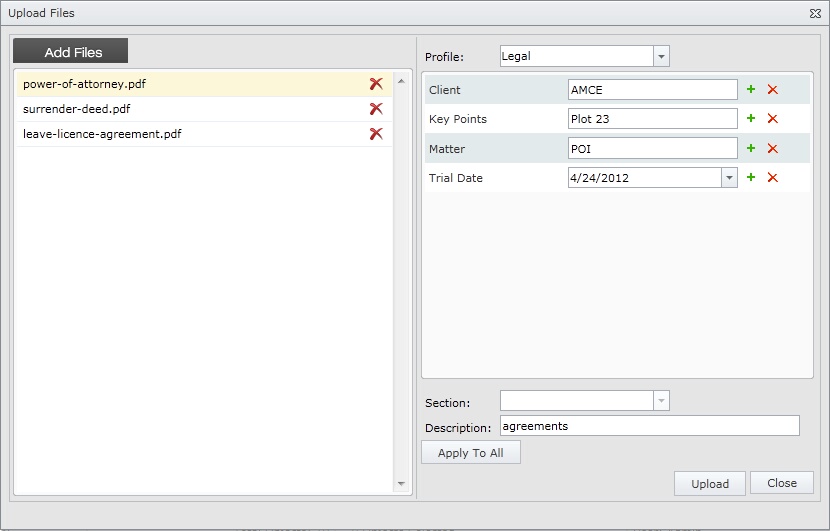 Assigning Profile and Indexes. |
Changing and Editing Profile and Indexes
•Select a document/folder from the Docsvault web interface
•Right click on the selected document to open its context menu and select Properties OR
Click Document Properties icon in the right panel and click on the edit profile icon.
•In case you want to change the Profile. In Indexes tab, select a Profile from the drop down list. Corresponding indexes are displayed in the index-value table.
•Assign appropriate values to the indexes.
•Save the changes.
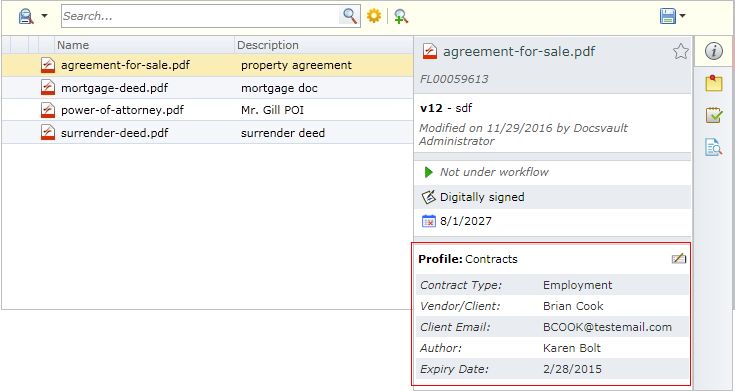 Editing Profile and Indexes. |
•When a document is copied or moved to some other location within Docsvault web client interface, the profile associated with it and all its corresponding property values will persist.
|

You can create and edit Profile/Indexes from Administration menu. For more information, see Profiles and Indexes in desktop client manual