Email Alerts on Documents
A user can subscribe to receive an alert when any changes occurs to a file or within a folder. An email notification is received when the alert is triggered. An alert can be set on folders or individuals files.
To add a document alert:
•Right click on the selected cabinet/folder/file to open its context menu and then click on Properties
•In Alerts tab, enter a name for the Email Alert
•Email Frequency: you can configure the frequency of your email alert here
•Select the Events to be monitored for this email alert
•Click on Apply to save the settings and OK to close the window
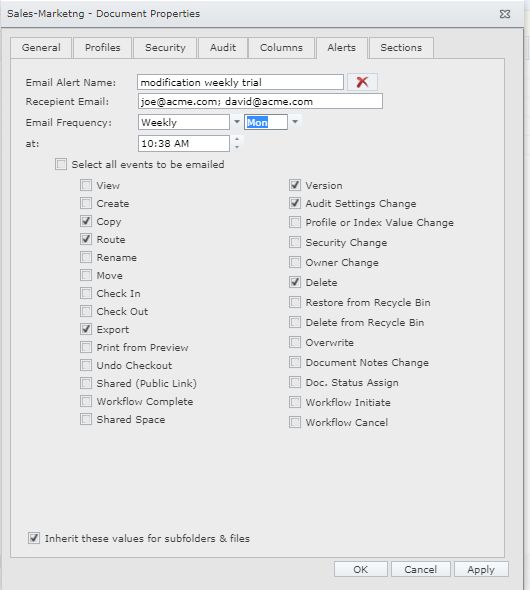 Email Alerts |
•To delete an email alert set for a document, click on the Delete icon next to Email Alert Name.
For this feature to work outbound emailing should be configured and 'Client side Alerts' should be enabled in Docsvault Server Manager on the server side.
|
