Navigation:  Docsvault Features > Importing  and Exporting Documents > Exporting Documents >

Using "Export To Folder"

Print this Topic Previous pageReturn to topNext page

You can export files and folders to any location on your hard drive, network shared folders/drive or to any removable drive.


Export to folder

Select the documents to be exported from the list or tree view panel of Docsvault Explorer


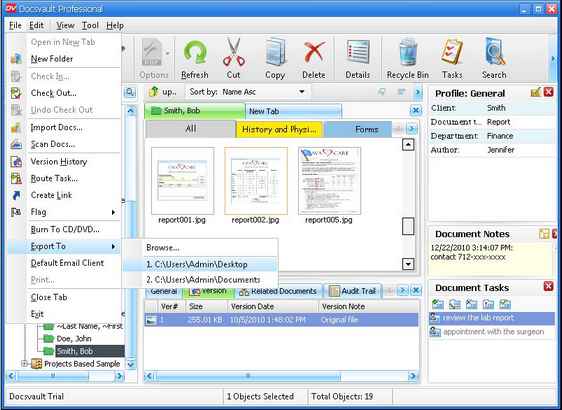
On the File menu, point to Export To and then select Browse to choose the location or select from most recently used export locations to quickly export the documents.  


Export to folder


Note:

Docsvault will not export link files. (file with an extension .lnk).


To export files and folders to CD/DVD, use the 'Burning to CD/DVD' option.


Page url: http://www.docsvault.com/online-help/professional/index.html?using_export_to_folder.html