Navigation:  Docsvault Features > Working with Documents >

Set Relation

Print this Topic Previous pageReturn to topNext page

Set Relation

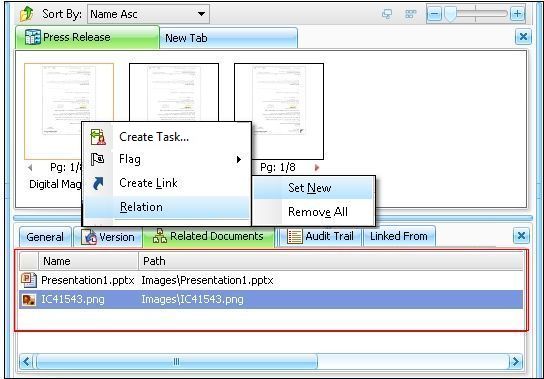
Set Relation feature allow you to group together multiple files and folders that are related. When a user navigates to a document, a tab  labeled "Related Documents" at the bottom panel will display all the related documents.


For example:

Consider setting relation between the images and the article to publish or between property agreement and the blue print of the property. Creating a relation will allow you to quickly create document to document relationships without having to go to search for it.


To set document relations:

Locate the file or folder you wish to assign an associated document.
Right click and select Relation. Select Set New relation.
Navigate to and click on the document you wish to set relation with the main document.
Click "Create" to create the relation.

To remove all the relation set, select Remove All.


Related Documents


Page url: http://www.docsvault.com/online-help/professional/index.html?set_relation2.html