|
Version History |

  
|
|
Version History |
|
|
Version History A file version system, conceptually is similar to a periodic backup. One of the most common problems encountered in organizations with large numbers of documents is that of version control. In a scenario, where multiple people are all working on a document at the same time the difficulty arises, when they all try to save their changes. Under such a circumstance file versioning comes to the rescue.
Docsvault Version features automatically ensures that no document is over written. When you make changes to a document, Docsvault will save those changes with the time, date and the owner of the edited copy as a 'Version Owner'. You can easily roll back to previous version as required. You can view the list of versions of that document using Version History from View menu.
File versioning is a technique to archive document contents at different stages of development i.e every time when a document is checked out, edited and checked back in.
When you open a document, Docsvault will always display the latest version of that document making it almost impossible to accidentally work with an older copy. This feature allows you to revert back to older versions in case undesirable changes have been made to your documents.
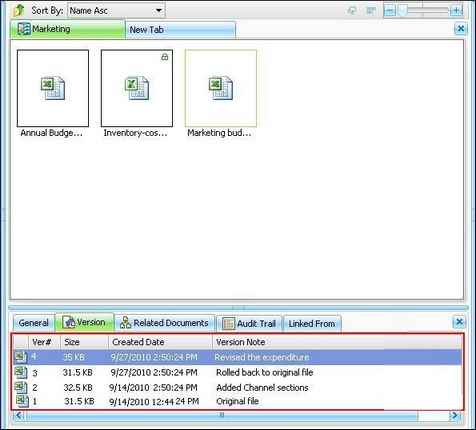
List of all the created file versions can be viewed from Version History dialog box. In addition to this, various version operations can be done from this dialog box. You can open and delete older version files, edit version notes and convert an older version file to current version. Shown below is Version History dialog box.
To get the Version History dialog box, select a file from Docsvault explorer:
From the View menu, click on Version History Or Right click on selected file. From the popup menu click on Version History Or Click on the Version tab at the bottom panel
Opening a version file
Press Enter key from the keyboard after selecting a row.
Converting older version to current version
Editing version notes
Deleting version file Prior versions of files can be deleted only from the Version History dialog box.
Page url: http://www.docsvault.com/online-help/professional/index.html?version_history.html |