|
Create a New Folder |

  
|
|
Create a New Folder |
|
|
Create a new folder
Docsvault allows you to create a folder or a group of folders at the same time. Folder Structures can be created using Folder Template.
This section will cover:
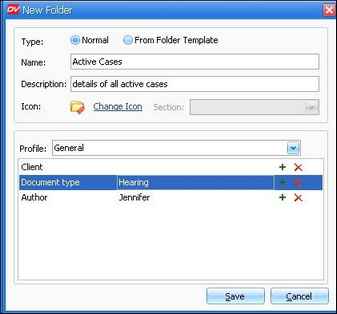
Creating a single normal folder
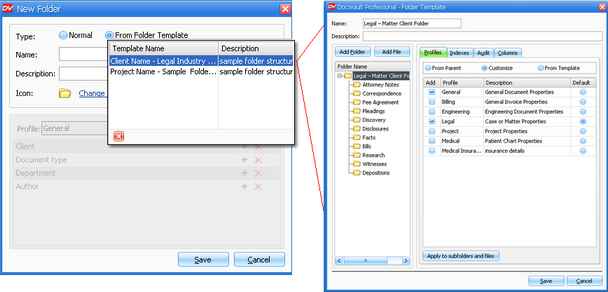
Creating a group of folders using Template
On the File menu, click on New Folder Or Right-click on destination cabinet/folder from tree view or list view panel to get the popup menu. Click on New Folder Or Right click at an empty region in the list view panel, below the list of documents to display the popup menu. Click on New Folder Or Click on the New icon on the tool bar.
To creating a group of folders using Template
Creating Folder Structure from Folder Template allows you to create a group of folders at the same time. A Folder Template can be applied to any cabinet or folder. When you apply a folder template, all of the folders in the template will be added to the cabinet/folder.
From Folder Template: Folder Template list the names of the templates to created a Folder Structure. They can be used to create Folder Structures in Cabinets or Folders as a sub-folder structure of a Folder.
Docsvault supplies some basic Folder Structure Templates in the Tools > Templates under Folder Template. You can create your own multiple templates of folder and file structures with properties like allowed profiles and audit trial settings and add them to the Folder Template List supplied. For more information, see Folder Template.
On the File menu, click on New Folder Or Right-click on destination cabinet/folder from tree view or list view panel to get the popup menu. Click on New Folder Or Right click at an empty region in the list view panel, below the list of documents to display the popup menu. Click on New Folder Or Click on the New icon on the tool bar.
Enter the folder name and description.
Page url: http://www.docsvault.com/online-help/professional/index.html?new_folder.html |