|
Find Text
To find text in PDF file use Find Tool.
To search in the current file.
| • | Open a document in Docsvault PDF Editor |
| • | Select the Find tool by either selecting the Find toolbar button  or choose Edit > Find or press Ctrl + F. or choose Edit > Find or press Ctrl + F. |
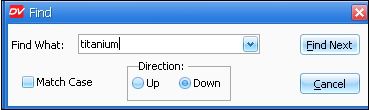
| • | The Find window will pop up. Enter the following options: |
| o | Find What: - Type word or phrase to search in the text box. |
| o | Match Case - Select this radio button to consider case when searching for words. Only words which match the text and case entered in the text box will be found. |
| o | Direction: Select the direction to search from in the document. |
| • | Click Find Next when you have made your selections to search the document. You may abort the process of search any time by clicking on the Cancel button. |
|
Find Text
|
 Important: Important:
| • | You will be able to search in a scanned PDF document where OCR is applied. |
|
Page url:
http://www.docsvault.com/online-help/professional/index.html?find_text.html
| 


