|
Edit Text
In Docsvault PDF Editor, you can edit the content of PDF document.
For example:
You have a document, which is updated once a year, but you want to keep the date on the pages current. You can modify the date easily in Docsvault PDF Editor without generating the PDF file from the source application - a real life savior when the original material is missing.
|
To edit the text in PDF File.
| • | Select the Insert or Edit text tool by either selecting the Insert or Edit text toolbar button  or choose Tools > Insert or Edit text or press Ctrl + T. or choose Tools > Insert or Edit text or press Ctrl + T. |
| • | Click within the text you want to edit. A blue box outlines the text would appear. |
| • | Drag the I-beam pointer to select all or part of the line of text, or position the I-beam pointer where you want to start typing. |
| • | Apply any one of the following: |
| ▪ | Type the replacement text or add new text at the position of the I-beam pointer. |
| ▪ | Press Delete key or click on Cut toolbar button. |
| ▪ | Click on Copy toolbar button or choose Edit > Copy to copy the selected area. |
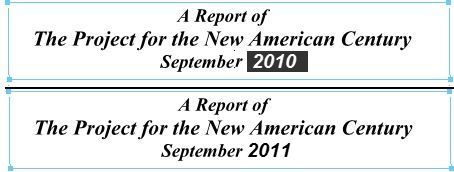
|
Editing Text
|
 Note: Note:
| • | In Edit text mode, the blue box outlines the text. Click outside the selection to deselect the selected text or press Escape key. |
| • | You can view and annotate scanned ocr'd document but you cannot edit the contents of the ocr'd file. |
|
 Tip: Tip:
| • | If you are working on a PDF document and you want to correct or modify the text it contains, it's essential you have the font installed on your computer. If the font is embedded in the document, you can change the properties and then edit the text. If you are unsure about the fonts other users have and you want them to be able to modify the text, it's best to stay with common fonts like Arial or Times New Roman. |
|
Page url:
http://www.docsvault.com/online-help/professional/index.html?editing_text.html
|


