|
To copy a document
You may copy and paste a document to create a new file in other folder. Similarly, you may move a document by cutting it from one folder and pasting it into another folder.
| • | Select files or folders from a cabinet. |
| • | From the Edit menu click on Copy Or |
From the toolbar, click on Copy icon.
| • | Select the new destination from the tree view. |
| • | From the Edit menu click on Or |
From the toolbar, click on Paste icon.
To move a document
| • | Select files or folders from a cabinet. |
| • | From the Edit menu click on Cut Or |
From the toolbar, click on Cut icon.
| • | Select the new destination from the tree view. |
| • | From the Edit menu click on Or |
From the toolbar, click on Paste icon.
This operation can also be performed by simple click and drag method.
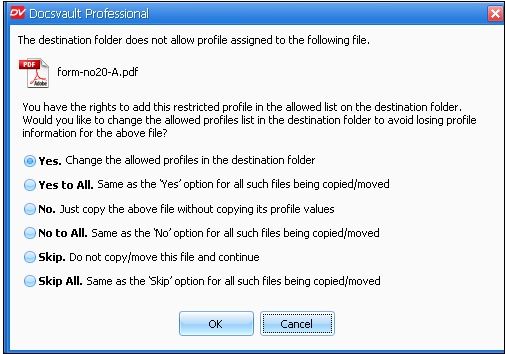
| • | When a document is copied or moved to some other location within Docsvault, the profile associated with it and all its corresponding index values will persist only if the destination folder allows the same profile under it. However, you can add the new profile in the allowed list on the destination folder. |
| • | Select the appropriate option and click on the OK button.
|

Page url:
http://www.docsvault.com/online-help/professional/index.html?copy_moving.html
|