Document Version
Docsvault Version features ensures that no document is over written thus maintaining the document integrity.
File versioning is a technique to archive document contents at different stages of development. Every time a document is checked out, edited and checked back in, Docsvault offers you the option to create a new copy of this document. Docsvault retains multiple versions of a document.
Docsvault asks the user for creating a new version of a file at three instances:
•When a file being imported has exactly the same name as a file already present at destination folder
•When a file being scanned has exactly the same name as a file already present at destination folder
•When a checked out document is checked in
•When importing a new version of a specific file
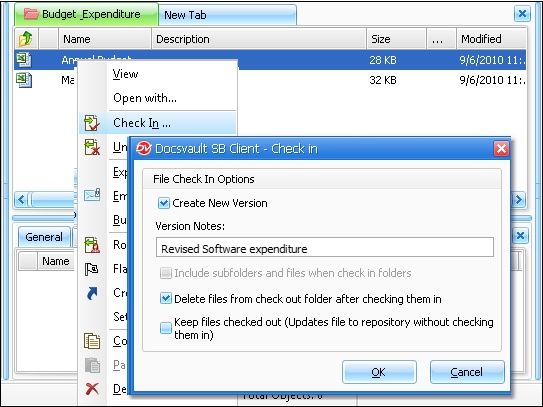 Checking In a document |
•Version History option from View menu will list the versions of a document.
|

Version History
Docsvault retains unique copies of each version of each document as it is checked out and back into the Docsvault. When viewing documents in folder view or search results list only the most recent version of the document is displayed. Version History option from View menu will allow the user to view previous document versions.
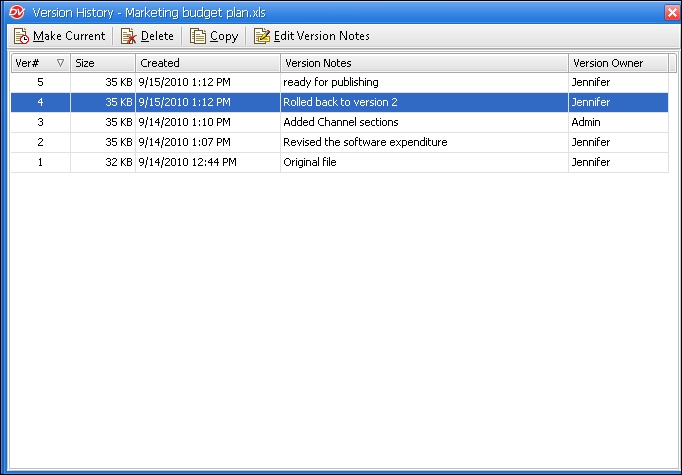 Version History |
|
•To edit a document, you must have at least 'New Version/Check out' rights to the document.
|
