Docsvault Filing Templates allow folders to be created automatically using metadata (index values). With the strict structure enabled, folders follow a predefined hierarchy to ensure consistent and organized document storage.
When a document is imported, Docsvault reads the assigned metadata and creates the required folders automatically if they do not already exist.
Example
Metadata:
Client: Smith & Associates
Matter: Estate Planning
Automatically created structure:
Legal Clients
└── Smith & Associates
└── Estate Planning
Strict Structure Behavior
•Folder structure follows the Filing Template
•Folders are created automatically using metadata
•Folder names are based on index values
•Template folders cannot be manually renamed
•Folder hierarchy cannot be changed by users
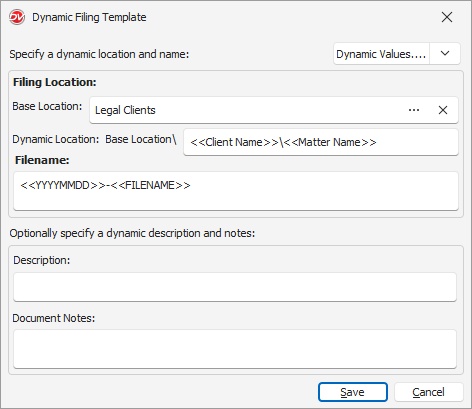
Configure Filing Template
•Open Profile dialog
•Click Filing Template
•Set Base Location
•Add dynamic metadata fields (Example: <<Client>>, <<Matter>>)
•Click Save
Folders are created automatically during document import based on metadata values.
 |
Example Output:
Base Location: Legal Clients
Client Name: "Smith & Associates"
Matter Name: "Estate Planning"
Filename: "Smith_Contract_Draft.pdf"
Final structure:
Legal Clients
└── Smith & Associates
└── Estate Planning
└── 2024-03-15_Smith_Contract_Draft.pdf
This structure ensures that all legal documents are consistently filed, making retrieval and organization seamless.
•Documents can be duplicated within strict folder structures without exporting and re-importing them, making file copying easier in structured environments.
|
