This feature is available only in Docsvault Enterprise & Ultimate Editions
|

The Docsvault Enterprise Edition offers administrators with insight into the usage of their Docsvault repository with the help of predefined reports within the system.
You can generate the following types of reports in Docsvault:
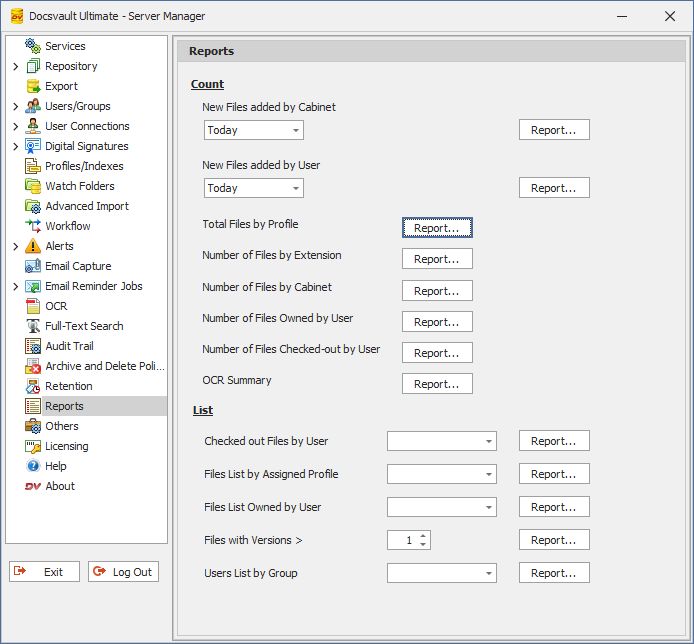 Reports |
Count
New Files added by Cabinet
Displays the count of new files added to each cabinet withing a specified timeframe
New Files added by User
Shows the count of new files uploaded by each user during a selected period.
New Files added by Profile
Shows the count of new files added using each profile within a chosen timeframe.
Number of Files by Extension:
Provides a breakdown of file counts by file extension across the repository..
Number of Files by Cabinet:
Lists the total file count for each cabinet in Docsvault.
Number of Files owned by User:
Shows the number of files owned by each user.
Number of Files checked out by User:
Lists the number of files currently checked out by each user.
OCR Summary:
Summarizes the OCR process, including file counts categorized by OCR status.
The above reports are also represented in bar and pie chart formats.
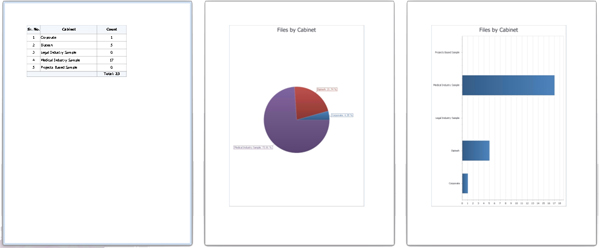 |
List:
Checked out Files by User:
This report will list all the documents checked out by selected user. The list will display file name and their location within the repository.
Files List by Assigned Profile:
This report will list all the files that are assigned the selected profile. The list will display the file name, location and index values of the profile.
Files with Owned by User:
This report will list files owned by a user.
Files with versions:
This report will list the files with versions greater than specified number of versions.
User Listing by Group:
This report will list users within a group.
All these reports can be viewed, printed as well as saved in pdf, html, rtf, xls, xlxs, csv, text or image file format.
Administrator group members can also access these reports from Docsvault Client.