Signature Requests Audit Log
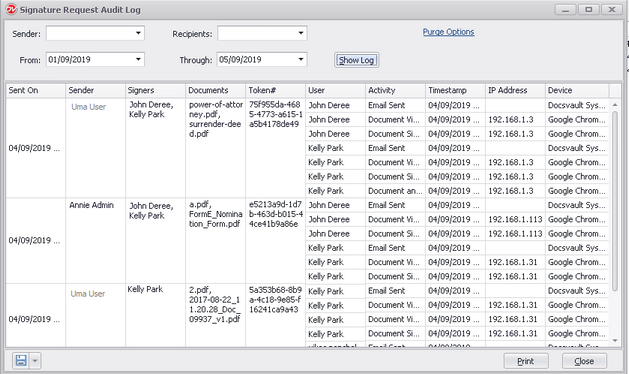
At times, you need a complete audit trail of your signature request transactions.This Audit Log report provides a summary of signature requests, documents sent and a list of activities performed. An Administrator can query the entire Signature Requests log and can filter the report by sender, signers and dates.
•Click on the Administration menu on the top navigation bar and select Query Signature Request Log to display the history of signature requests.
•To query signature requests sent by a particular user
oSelect the name from the drop-down box next to Sender
•To query signature requests signed by a particular signer
oSelect the name from the drop-down box next to Signers
•To query for signature requests created between 'specific dates'
oSpecify the date range in From & Through
•Now click on Show Log button
This report displays the date on which request was sent, sender name, signers, documents shared, token of each request, activities performed by each signer along with timestamps, and their IP location / Device.
|
Reporting & Export
The signature requests log results can be printed and saved in various formats like PDF, xlsx, csv, etc. using the Export button in the left bottom corner of the report window.
Purge Option
•To permanently remove old and unneeded Audit Log data, click on the Purge Options link.
•In the Purge Signature Requests dialog box, select the date. This will delete all request that were sent before the specified date.