Adding a New Status
To add a new status to the list of existing ones, you need to have the system right 'Customize Document Status' .
To Add a Document Status
•Select Edit Doc. Status from Administration menu
•Click on the New button to add a new document status.
•In the Status Name box, enter the name for the new document status.
•Enter the Description for document status.
•From the Flag list, select a flag image.
•Versioning: Enable this option to maintain a version of a the document when in this status.
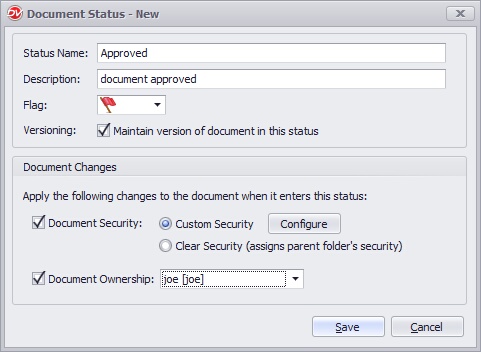 Document Status |
Defining Document Changes
It is possible to change document security and the ownership of a document when that document is set with this status.
•Document Security
oCustom Security: You can apply a customized security to the document when it enters this status. Click on Configure.
oClear Security: Select this option to clear the security of a document when it is set with this status. The document will inherit the security of its parent folder.
•Document Ownership:
oSelect this option to change the ownership of the document. Select the user name from the list box.
•Click on Save to save the document status.
•The document status name and flag image has to be unique.
|

•Users with system rights of 'Edit Doc. Status/Icons' rights can create new document status. •Minimum 'New Version/Check out' rights are required to assign a document status while assigning a document status for the first time or creating a new version of a document •Minimum "Overwrite" rights are required to change an existing document status assigned to a document without creating a new version
|

Archive Policy Hold Flag
"Archive Policy Hold" is a predefined document status that cannot be changed. It is used to preserve critical documents from being automatically archived or deleted, ensuring compliance with legal hold requirements or operational needs. Only authorized users can assign this status to documents.
To edit a Document Status
You can change the status name and flag image for any document status.
•Select Edit Doc. Status from Administration menu
•Select the Document Status to edit.
•Click on the Edit button to make the changes and then click Save.
You can also monitor Document Status assigned to a document by enabling it from the Audit tab in the Properties dialog box.
To delete a Document Status
•Select Edit Doc. Status from Administration menu
•Select document status to delete and then click on Delete button
•The document status gets deleted from the list.
•If the document status is deleted, it will be cleared from all of its assigned items.
|
