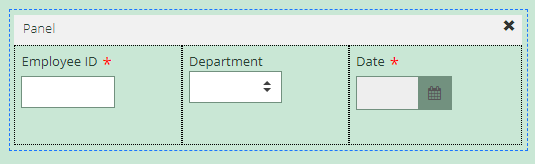
There are times that you will want to keep two or more fields on the same line (side by side.) Other times, fields will need their own lines. Docsvault provides an easy option to build multiple columns in your forms and place your form fields in them.
To build multi-column forms
•In Designer mode, click on the Panel field from the 'Add Fields' left panel
•In Properties panel, under Columns - add multiple columns by clicking on the Add button and set the width in percentage
•Now, drag and drop any fields under the column you wish to display
Docsvault's eforms are responsive, and the columns will re-arrange depending on the screen size of the device they are viewed on.
 |