Docsvault allows you to create structured relationships between your document metadata. This helps you organize your documents more efficiently and accurately.
Example:
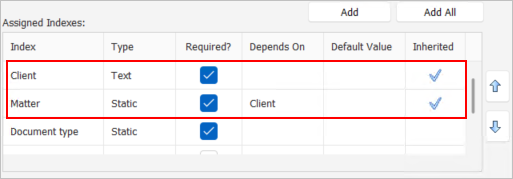
If you have "Client" and "Matter" index fields, you can set up a dependency so that the available matters are automatically filtered based on the selected client. This ensures that only relevant matters are displayed for each client.
Setting up Dependent Fields
•Navigate to the "Profile" Form
•Select the Dependent Field: Identify the index field you want to make dependent (e.g., "Matter").
•Set the Parent Field: In the "Depends On" column, select the master field that will influence the options of the dependent field (e.g., "Client").
For example, in the image below:
 |
How it works:
Once the dependency is set up, the system will automatically filter the options for the dependent field based on the selected value of the master field. For instance, if you choose "Client A," only the matters associated with "Client A" will be available in the "Matter" field.
•Initially for new records, you might need to manually select the appropriate dependent value. However, the system remembers previous relations and will automatically suggest the correct options in the future.
|
