Searching folders and files using Profile Search
Profile Search allows you to quickly locate documents based on their metadata.
•Click the Profile Search icon in the toolbar.
•Select Profile: Choose the relevant profile from the drop down list.
•Index Fields: Input keywords or values into the desired index fields. For instance, if you're searching for documents created by "John Doe," enter "John Doe" into the "Creator" index field.
•Include: Specify whether to search for files, folders, or both
•Search in Other Fields: Expand your search to include fields like name, descriptions, notes or text inside files.
•Search in Archive: Check this option if you want to search for archived documents.
•Click the Search option.
For example: To locate an agreement related to a specific matter for a particular client, you could use the "Client Docs" profile and specify search criteria in multiple profile index fields as below: |
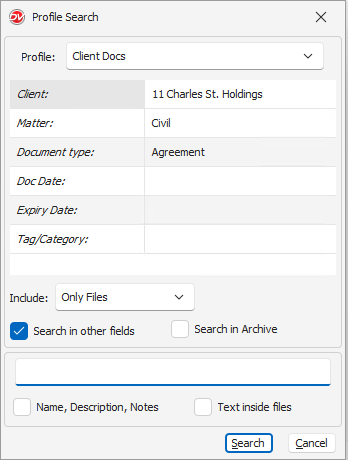
By combining these search criteria, you can effectively narrow down your search results to find the desired agreement.