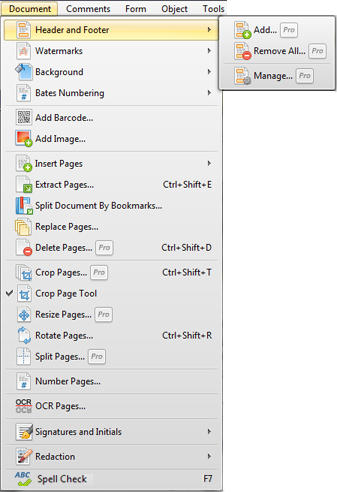
Documents Menu
The Document menu allows you to manipulate pages in a document. For example, you can Insert, Extract, Delete, Rotate, or Crop pages, Sign or Redact the document.
Header and Footer allows you to add and manage a header and/or footer in your whole document or for setting page range Watermarks places created or taken from a file watermarks on pages of your document on your desire place on the page content or as a background
|
Background option allows you to add a background to your PDF document. It may be created of an image file or just a color and it may be applied to the whole document or the selected pages only Bates Numbering allows you to add identification number to each page of the PDF document Add Barcode... creates a barcode with your personal information or another text Add Image... places an image file on a page as a stamp or page content Insert Pages allows to insert empty or new PDF page(s) from another PDF document Extract Pages... creates one or more documents with selected pages from the current PDF document Split Document by Bookmarks... separates your document by root bookmarks and saves the parts into multiply PDF documents Replace Pages... allows you to replace pages in an active document with pages with another document and manage their content and page objects from the active PDF Crop Pages... allows you to crop the active document's pages based on setting Margins for the individual boxes Crop Pages Tools allows users to select the desired area to be cropped Resize Pages allows you to resize the selected PDF pages Rotate Pages allows you to rotate pages with more control than the simple toolbar controls Split Pages option allows users to split pages into multiple pages Number Pages... creates the page-numbering ranges for visual organizing a PDF document OCR Pages... recognizes the text of the scanned PDF document to make the scanned text searchable and selectable Signatures and Initials allows you to draw by mouse (or stylus) or add from an image your own signature and further apply to PDF documents Redaction allows you to permanently hide the selected text or images. |