|
Filing Area consist of:
Collect Folders
You can set up a collect folders on your machine whereby they can drag a file or folder that contains multiple files from your desktop and drop it into an assigned folder. When new documents are created in or copied into these folders, the service will display the documents into the filing area from where it can be filed into designated Docsvault folders easily.
After filing the documents in Docsvault, the original source files can be backed up to a separate folder or it can configured to delete the original file to avoid duplicated.
To configure Collect Folders
| • | Create a folder on your machine that will store all the documents to be imported into Docsvault for filing. |
| • | Select Tools > Options > Imports. |
| • | In Collect Folders section, click on Add button to set up a collect folder.
|
|
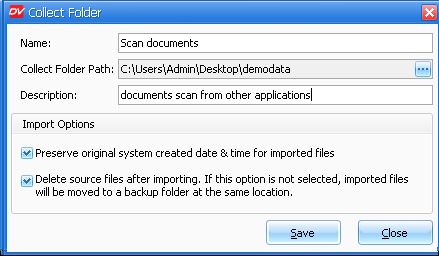
Setup Collect Folder
|
| • | Enter a sensible name for collect folder. This name will be displayed under the local Collect Folder node in the Filing Area. |
| • | Collect Folder Path. Browse to the location of folder to be added as collect folder. Normally the folder you select is the same folder you created above. If the collect folder includes sub-folders, you can access them all with a single connection. |
| • | Enter brief description of the folder in Description text box. |
Import Options:
| o | You have option to either preserve the original system date and time (created and modified) of a file/folder or set the actual date and time of import into Docsvault |
| o | You can handle the files and folders by selecting one of the following options after they have been filed into Docsvault |
| ▪ | By default, Docsvault will move the source files to backup folder at collected location (files are moved to a folder named ' BackupData_Docsvault' at the source location) |
| ▪ | Select the checkbox next to Delete source files to delete the files in the local collect folder and move it to the Recycle Bin. |
| • | Click on the Save button to save and add the collect folders in the Local Collect Folder list. |
Note that there is no limit to the numbers of folders that can be created as Collect Folder.
To learn how to file documents from Local Collect Folder, see Importing document from Filing Area.
Page url:
http://www.docsvault.com/online-help/professional/index.html?filing_area.html
| 


