Navigation:  Docsvault Features > Templates >

Audit Template

Print this Topic Previous pageReturn to topNext page

Audit Template

Audit template can be used to log details about user's actions. For example you can configure the template such that whenever a document is deleted or exports; assign or clear flag, details about the action are logged. Details logged include the action along with the date and time of the action.


Docsvault provides defaulted settings to make monitoring setup as easy as possible. You can also use these preset Audit Template and add or delete the events to create custom Audit template sets.


To create a Audit Template

Select the Tools tab and click the Template option. This will bring up the Template Window.
From the left panel, select Audit Template. Click New button to add a Audit Template.
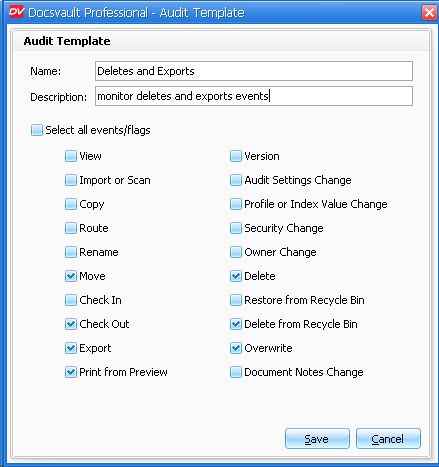
In the Audit Template, enter a name and description for the new Audit template.
Select the events to be recorded by checking the corresponding check boxes.
Click the Save button to save the set of selected members in a Audit Template. The Audit Template will now be listed in the Audit Template drop-down.

For example:

To monitor all that activities to ensure that documents are not taken out of the organization without adequate permission. You can set the Audit Template by selecting the events as shown in the following image.


Audit Template


To edit a Audit Template, click the Edit button in the Audit Template list.
To delete a Audit Template, click the Delete button in the Audit Template list.

Apply a Audit Template

To learn how to use  Audit Templates with a file, see Setting Audit Trail on individual document.


Page url: http://www.docsvault.com/online-help/professional/index.html?audit_template.html