The Find Panel allows users to quickly filter files by entering text directly within file lists. As you type, the list dynamically updates to display only the documents that match the entered text. The filter applies to file names and other visible column values, making it easier to locate documents within the current list.
The Find Panel appears above the file list and can also be toggled using Ctrl + F.
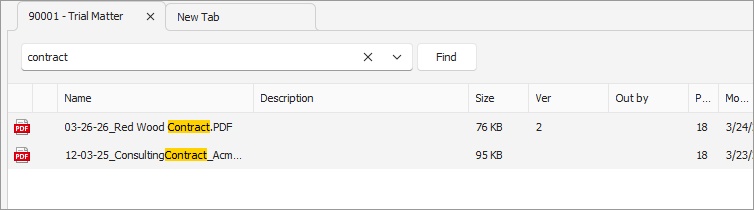 Find Panel |
The Find Panel is also available in the following windows:
•Import Dialog to locate recent profiles or template filenames
•File Listing
•Search Results
•Recent Tabs
oCreated
oModified
oAccessed
Enable Find Panel
To display the Find Panel above file lists:
•Go to Tools > Options > General > Display
•Enable Find Panel
Administrators can configure the default behavior through Server Manager > User Settings.