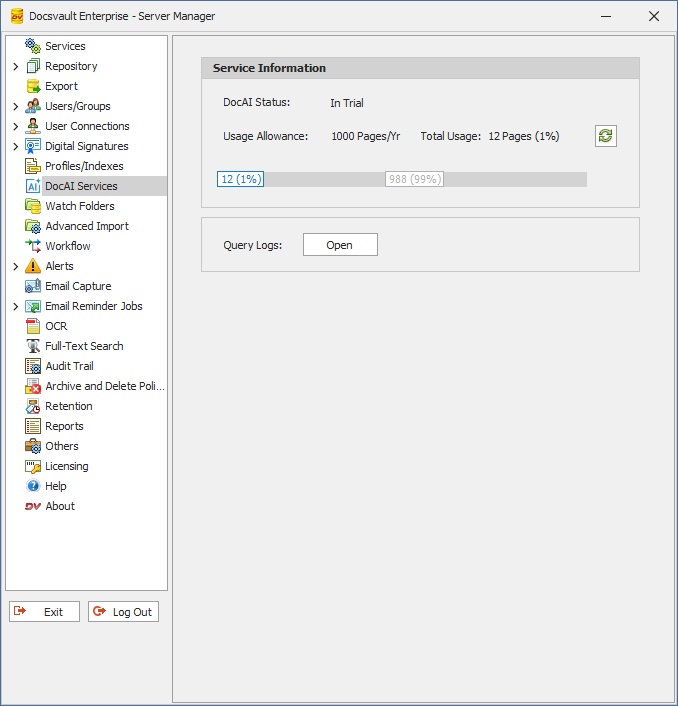
The DocAI Services node in the Docsvault Server Manager displays the current status of DocAI services, usage details, and access to query logs.
DocAI Status
Displays the current activation status of DocAI.
•Doc AI Status. Displays the status of DocAI service. (for example, Not Activated, In Trial, Active and Expired)
•Start Trial - Click to activate the trial and begin using DocAI features
Once activated, the status updates automatically.
 AI Services Information |
Usage Allowance
Shows the total number of pages available for processing per year.
•Usage Allowance - Displays the allocated page limit (for example, pages per year).
•Total Usage - Displays the number of pages used and the percentage consumed
Use the Refresh icon to update usage information.
Query Logs
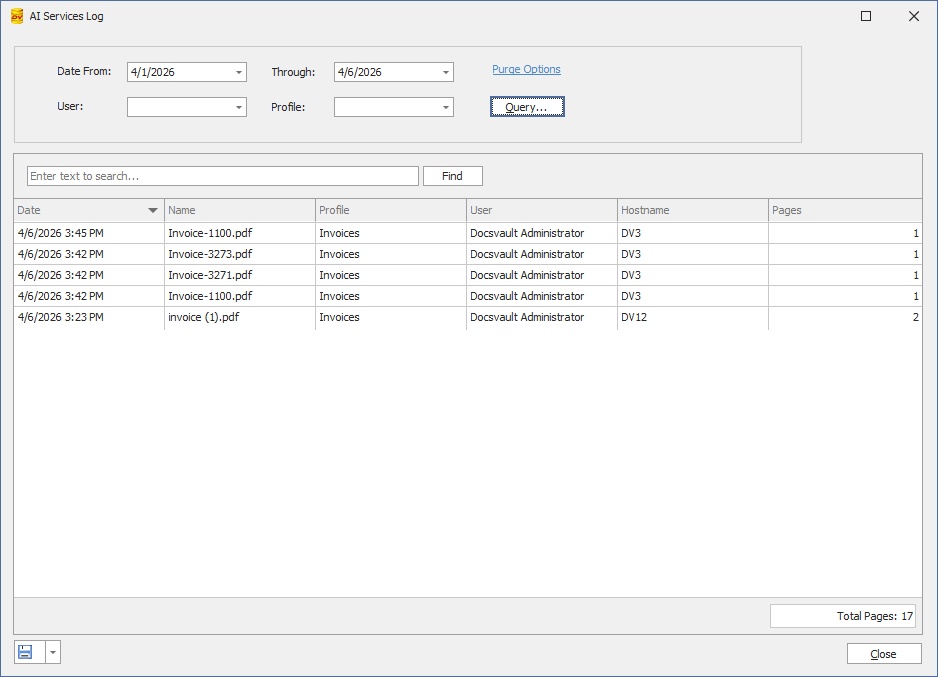
Click Open to view the DocAI query logs. This allows you to:
•Review processed documents
•Check extraction activity
•Troubleshoot processing issues
•Monitor DocAI usage details
•Filter and set query
•Purge old logs
•Save report in different formats
 AI Services Log |
•DocAI processes documents using secure external AI services. Only the required data is transmitted over encrypted connections and used solely for requested operation. Data is not used for training and is not retained beyond processing. Administrators control availability, and users choose when to run AI Capture. For sensitive or regulated data, review your organization’s policies before use. |
