Custom Fields
In Records Retention Management, the basic purpose of custom fields is to assign additional data pertinent to records. It can be useful to search and retrieve records quickly thus enabling you to react instantly and improve productivity.
•In Reseller Retention Console, click Custom Fields to open 'Add/Edit Custom Fields' dialog box as shown below:
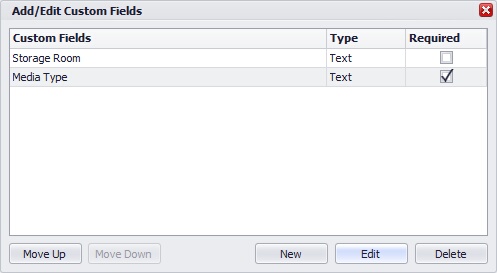 Custom Fields |
|
•Click on New button to create a custom field.
•Enter a 'Custom Field' name.
•'Field Type' are of two types: User Input and Static
o Select 'Static' radio button to create static field type.
To add values to static list, enter a value in the text box and click on Add button
o Select 'User Input' radio button to create user defined field type.
From 'Data Type' drop down list, select a value from Text, Numeric and Date.
•Click on Save button to save and create a custom field.
Editing a Custom Field
•Select the custom field from the list and click on Edit button
•In the edit dialog box, make the necessary changes
•Click on Save button to save the changes
Deleting a Custom Field
•Select the custom field from the list and click on Delete button
•This will display the confirmation message
•Click Yes button to delete the custom field
Changing the Field Type
You can change the type of an field type i.e static to user defined and vice versa
•Select the custom field from the list and click on Edit button
•In the edit dialog box, under the 'Field Type' section, select the desired field type radio button
•The values entered by you before conversion for the 'User define' field type, will automatically be available for selection when converted to 'Static' field type
•Click on Save button to save the changes
•Only text data type indexes can be converted from 'Static' to 'User Input' and vice versa. •You can change the data type of custom field from Numeric/date to Text data type. Note that once converted it is not possible to convert it back to Numeric/date data type. |
