Stay Informed with Alert Notifications
The alert notification system empowers you to:
oCustomize your alerts: Set up personalized email notifications for specific files, folders, tasks, and work routes.
oStay updated: Receive timely alerts whenever changes occur to documents or tasks relevant to you.
How it Works
Once you enable email alerts in Docsvault, the system will monitor your chosen files and folders for any modifications. When changes are detected, you'll receive an email notification detailing the specific changes made.
To activate the alert system:
1.Configure Email Settings: Set up an outbound SMTP server in Docsvault.
2.Enable Client-Side Alerts: Turn on the client-side alert feature in the Docsvault Server Manager.
With these steps, users can start receiving alerts for variety events, including: viewing, importing, scanning, copying, exporting, checking out, checking in, changing audit settings, modifying profile or index values, altering security permissions, deleting, restoring from the Recycle Bin, and overwriting.
For detailed instruction on setting up email alerts, please refer Alerts in Server Manual.
Task Notifications and Email Alerts
Task notifications are update alerts sent to assignor/assignee for the changes to tasks and work routes they are involved in.
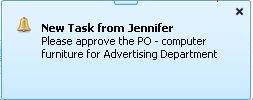 Task Notification |
Task notification is indicated by pop-up alert. This can be accompanied by the email alert.
Note: User’s tasks and workflow notifications older than 90 days are deleted from the system automatically for optimization.
Files and Folders Email Alerts
For example: When you subscribe to a folder, Docsvault automatically starts tracking the changes to this folder. Docsvault then alerts you by sending an email notification informing you when new documents are created in this folder or when any of the documents within the folder are changed.
|
The users can specify the events to which they wish to subscribe. These events are:
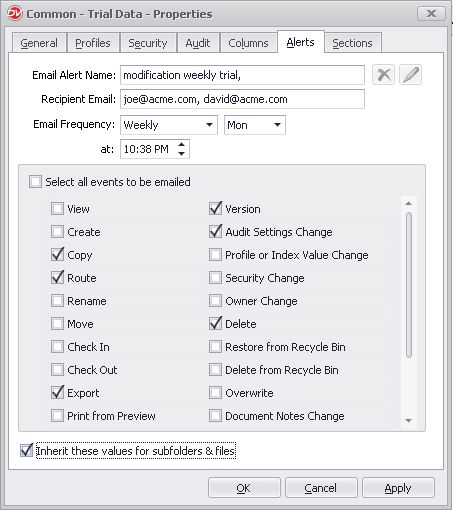 Events Alerts |
The above setting will send a weekly email alert to the user when any procedure such as route, checkout, deleted, overwrite or when audit setting is changed on a currently selected document.