Convert common file formats to PDF
You can make PDF files without the need for additional software in Docsvault. When it's time to share important document such as Word, Excel, CSV, txt, Tiff, images, etc. convert them to high quality PDFs that are easy to distribute and look right on any screen.
Steps to convert a Word, Excel, PowerPoint, or any text and image file to PDF
•Select a file in Docsvault
• Right-click and select 'Create PDF Version’
• Docsvault will automatically convert the selected file to PDF file and create a new version.
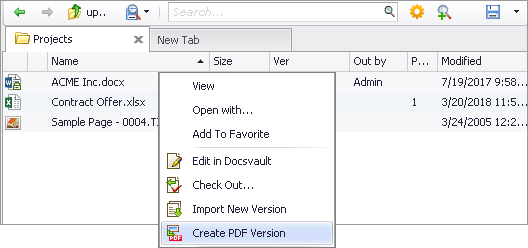 Convert common file formats to PDF version |
Manage PDFs with Version Control
PDF Creation & Manipulation is fully integrated within Docsvault system. Work can be done in a native file format of a document and then during document check-in you have the option to save the file in PDF format as the next version.
Using Docsvault's PDF features, you can easily:
•Convert any document to a PDF file
•Maintain original source document and converted PDF version in a single version history
•Check-in a document and save the next version in PDF format, along with version notes and document status.
•Modify, and rearrange pages within the document
•Use annotation tools such as comment, stamp, highlight for easy collaboration with peers
•Merge a group of document into a single PDF file
•Email any document as a PDF file
•Digital sign PDF documents
•Electronically revise and approval PDF files