Comments Menu
The Comments menu allows you to Flatten, Summarize, Import, Export Comments to Data File and view Comments List and Styles Palette.
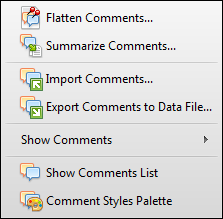 |
Flatten Comments... flattens the annotations in case you want to make it impossible to change them |
Summarize Comments... allows you to get a summary of all the comments associated with a PDF to view them as a new PDF Document, Rich Text Format, Plain Text or HTML Page. |
|
Import Comments allows you to import comments and add it to a PDF document |
|
Export Comments to Data File... allows you to export comments in order to publish or send them to someone |
|
Show Comments allows you to select comments that you want to display from the list |
|
Show Comments displays all comments |
|
Comments Styles Palette opens the palette with the list of comments’ styles |