Bates Numbering
 Bates Numbering is a method of indexing documents for easy identification and retrieval by adding an electronic number and date to each page of the PDF document. This option allows you to add identification number to one or more PDF documents
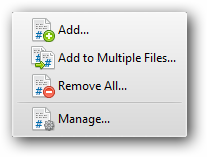
Main Menu choose Documents > Bates Numbering >
 |
The  Add dialogue box allows to add bates number to PDF documents. The results will be shown in the preview.
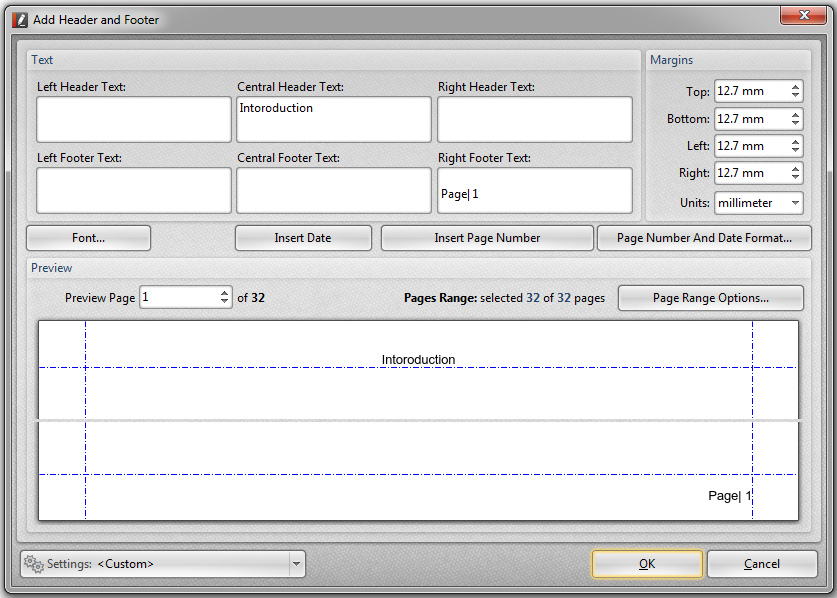 |
In the Text dialogue box, you can apply text for the Heater and Footer to display in left, center or right side of the page.
In the Margins dialogue box, you can adjust the distance of header and footer from the edge of the page by setting non-zero margins using the selected "user units".
In the Units field you can choose the measure units to use for the margin movements. Valid values are: point, inch, centimeter, millimeter and pica.
In the Font box you can specify the font of text to use when displaying the Header and Footer text.
 |
The Preview option shows the change of the Bates number's appearance before you add it to the document.
|

The Subset drop-down list works in conjunction with the other Pages Range to select groups based on order within the documents.
The  Add to Multiple Files... dialogue box allows to number sequentially across multiple documents.
 |
In the Source Files dialogue box, you can select the files for adding the Bates numbering.
 |
The Subset Pages Range drop-down list is the conjunction with the other Pages Range to select groups based on an order within a document.
In the Output Options dialogue box, you can set the appropriate output options for creating and saving the file(s).
•The Replace file names starting and ending Bates numbers (e.g.000100-000115.pdf) radio button allows to replace only the certain numbered files.
 |
•The File Name radio button allows to specify the name of the output file. You may enter any valid file name.
 |
The Macros button  opens a submenu of file name macros that you can use into automatically generate the files.
Note: The specifying of the file name is especially useful for repeat jobs and to set the file numbering when single-page image files are being generated for multiple document pages.
The Destination Folder displays the folder pass where the file will be placed.
The Browse button  opens the browse to upload the file(s).
•The Overwrite Existing Files check box  allows to overview already created and saved files.
•The Open folder with results after the numeration check box allows to see the saved files with numerated documents..
• The Create Log File check box displays the folder pass where the file will be placed.
•The Options button  allows to edit information and to create a new template for the Bates numbering files.
The Remove All...button  removes all bates numbers from the existing document.
 |
The Manage... button  allows to adjust Bates numbers.
 |
The List dialogue box displays the list of all Bates numbers that were added to the document.
•The Add New... button opens the Add Bates Numbering dialog box for adding new Bates numbers to the document.
•The Edit... button opens the Add Bates Numbering dialog box for editing the selected Bates numbers from the document.
•The Remove button removes the selected Bates numbers from the document.
•The Remove All button removes all bates numbers from the document.
•The Close closes the dialog.