Highlight Fields
Highlight Fields. Allows you to set the highlight options for the form fields.
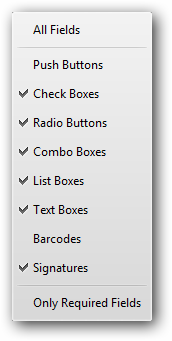 |
•All Fields. Allows you to apply highlight options to all kinds of form fields.
•Push Buttons. Highlights buttons which initiates a change on the user’s computer, such as opening a file or others.
•Check Boxes. Highlights boxes which present yes-or-no choices for individual items. If the form contains multiple check boxes, the user can typically select as many or few of these as wanted.
•Radio Buttons. Highlights buttons which present a group of choices from which the user can select only one item.
•Combo Boxes. Highlights boxes which allow you either choose an item from a pop-up menu or type in a value.
•List Boxes. Highlights boxes which allow you to choose a displayed list of options.
•Text Boxes. Highlights boxes which allow you to type in text.
•Barcodes. Highlights barcode fields.
•Signatures. Allow you electronically sign a PDF document with a digital signature.
•Only Required Fields. Allows you to select a border color of form fields. The border appears for required form
•fields only after you attempt to submit the form.