This feature is only available as an add-on module and requires separate purchase and activation.
Prerequisite: Install Docsvault Web Server
|

Digital Signature uses unique digital certificate issued to individuals for signing documents. Digital signatures are legally binding and are a preferred method of signing documents for compliance with various standards & regulations as they preserve the document’s integrity, verify the identity of the signer and provide for non-repudiation of signatures within and beyond your organization. Once a document has been digitally, any unauthorized changes to it would render the signature invalid. It is an electronic process which assures the recipient that the contents of signed documents have been created by a known sender and it has not been altered after it was signed.
Docsvault Digital Signatures add-on enables your organization to create high-assurance business processes. Users can digitally sign PDF documents within the Docsvault system on demand, route digitally signed documents in a workflow for multiple approval signatures, auto-sign documents as part of a workflow and verify the validity of all signatures in a digitally signed PDF.
Docsvault digital signatures are compliant with worldwide e-signature legislation like HIPAA, 21CFR part 11, US E-Sign law, EU law, SOX, GPEA, JITC and many more. Currently e-signatures are enforceable in more than 24 countries - including Australia, Canada, most European countries, India, Turkey, United Kingdom and United States.
Use of Digital Signatures:
Docsvault Digital Signatures can be used to:
•Sign electronic contracts, invoices and notices
•Approve periodic maintenance tasks, project budgets, quality checks
•Sign legal documents and agreements
Benefits of Digital Signatures:
•Save Time and Money - Eliminate the need to print and sign
•Quality and Compliance with regulations:
oOnly allows the authorized user to sign
oGives legal validity to electronic records, notices, and contracts. Digitally signing a document ensures that data cannot be renounced or denied
oComputer-generated signatures can contain additional information for identity, purpose, etc.
•Multiple Approvals - Multiple signatures can be applied on any document with each signature having its own purpose
•Seamless Workflows: Route documents to the people who need to sign documents through the Workflow process without having to print out documents just to sign them
•Speedy Result - Signed documents can be sent or submitted anywhere, and receiver can verify each document’s authenticity using the standard Acrobat Reader
•Allows Customization - Signatures can be customized with available fonts, sign and even images
How do digital signatures work for authentication?
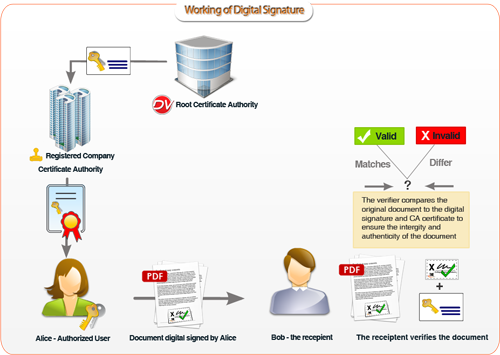
Assume you want to send a project contract to your client. You want to give assurance to your client that the contents of the document were not tampered and that the document really is from you.
•You draft a project contract
•Using Docsvault Digital Signature add-on, you sign the document
•When you sign a document, a digital certificate issued to you by Docsvault is embed to the document using your public and private key pair. The keys are used to lock the information in an encrypted mode. (Note that it will be different each time you sign a document)
At the other end, your client receives the document.
•To verify the signature on the document, your client will open the document in say Adobe Acrobat Reader. The application first uses the certificate authority's public key (issued by Docsvault) to check the signature in your digital certificate.
•Successful de-encryption proves the certificate to be valid
•A valid certificate gives confidence to your client that the document did indeed came from you and has not changed since you signed it. If the document was either altered after it was signed or originated by someone else, Acrobat Reader will indicate it as invalid.
Note that using a digital signature does not encrypt the contents of a document itself.
Represented diagrammatically:
 |
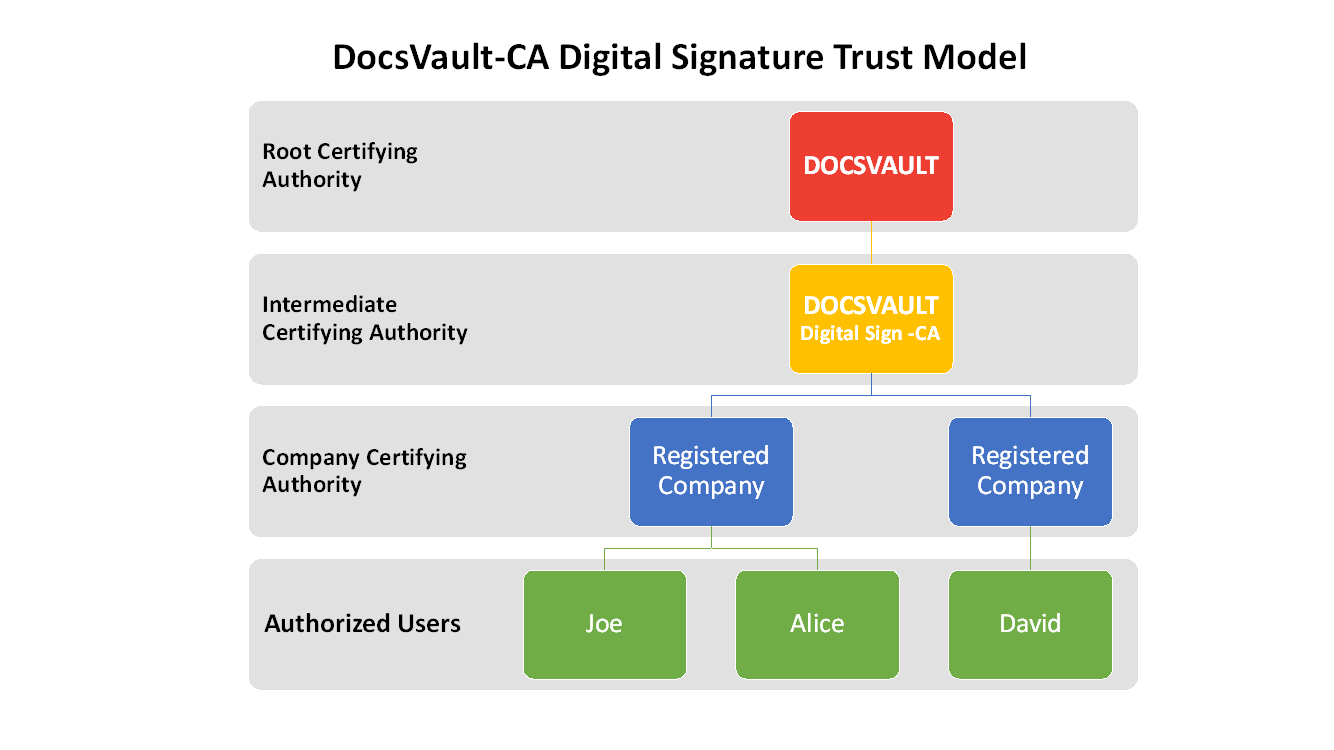
Below is the structure of Docsvault Digital Signature Trust Model.