Setting Workflow User Preferences in User Options
This feature is available only in Docsvault Enterprise & Ultimate Editions
|

You can specify your workflow preferences from Tools > Options > Workflow section.
Setting "Email Alerts" Preferences
The workflow engine generates workflow events email notifications for all workflow participants, managers and watchers. This tab allows you to configure the workflow email notifications for various events that you want to subscribe to.
Here, you can also set reminder emails for tasks assigned to you before specified days of their due date.
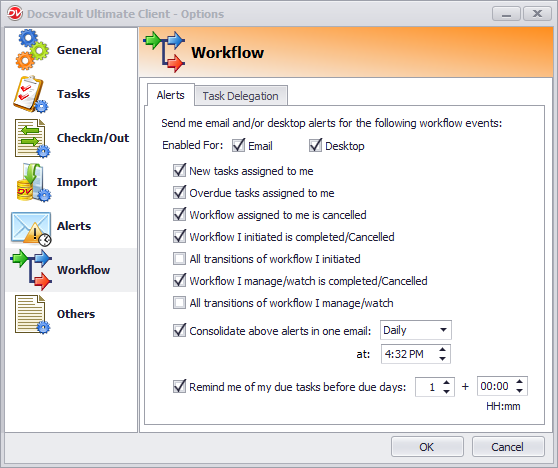 Workflow Email Alerts |
Setting Automatic Task Delegation Preferences
The Tasks Delegation tab allows you to specify another user or group in the system who will be responsible for your workflow tasks between the specified dates. Workflow delegation is very useful when you are on a vacation or temporarily unavailable to complete your workflow tasks for any reason. Once set, all your new workflow tasks will automatically be routed to the delegated user or group and they will be notified about those new tasks. To delegate tasks indefinitely simply leave the ‘Starting From’ and ‘Through’ date fields empty.
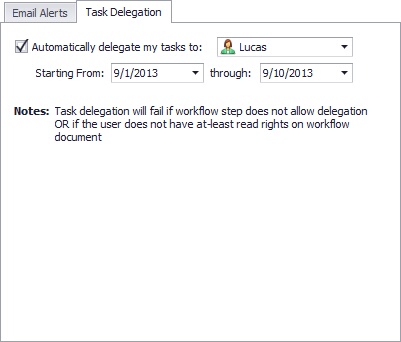 Task Delegation |