New Features
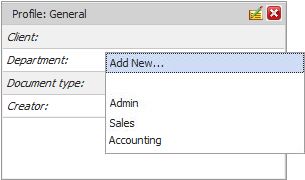
Add New Static List Values on The Fly
New functionality to add new items for a static list index field list on the fly while filling out the profile. Only authorized users with “Edit Profile” system level right will be able to add new values. This greatly improves the consistency of data input by end users and thereby consistency in folder and file names when used in conjunction with automatic filing and naming rules.
Microsoft 365 Modern Authentication (OAuth2) Support
•Email Alerts: OAuth2 Authentication has been introduced for SMTP protocol when configuring Email Alerts with Microsoft 365 accounts. This enhances security and simplifies the set-up process.
•Email Capture Add-ons*: OAuth authorization has been introduced for IMAP protocol when configuring Email Capture Jobs with Microsoft 365 accounts.
New PDF Viewer for the Preview Panel in Public Share Interface
•A new PDF viewer for the preview panel within the Public Share Link interface.
•Users can now effortlessly zoom in, rotate, and navigate through PDF pages. Additionally, they have the ability to search for specific text within PDF documents, access document properties, and conveniently print PDF files.
•Note: If "Download" access is NOT granted, viewers won't be able to print or download the PDF files. However, they will still have the ability to zoom in for better clarity and utilize other navigation features for an enhanced viewing experience.
Add My Workspace Items to Your Favorites Toolbar
Personalize your Favorites toolbar in the desktop client application with shortcuts to your frequently used public share, workflow, check out, task calendar and recent documents nodes.
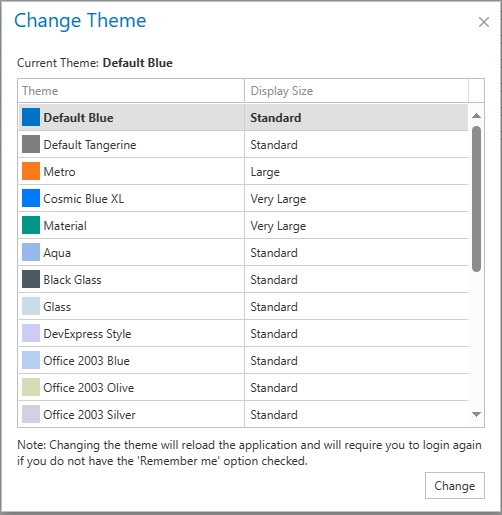
Added New Interface Themes for Desktop Client and Server application
Introduced a variety of modern themes for both the desktop client and server application, including themes optimized for high-resolution displays.
Web Interface Themes
Added multiple new themes for the web client to take your experience working with the Web Interface to the next level. Introduced many themes specially for high-resolution monitors.
Customized Column Inheritance
New folders created will now inherit the customized column settings of their parent folder. This will allow folders created automatically through folder templates or Profile rules to be consistent with the desired columns throughout the subfolder structures.
API Add-on
Extended API functionality by adding new API calls for:
•Searching for files with Profile and Index field values.
•Enhanced 'Newfile' API call, which introduces a different approach. This updated API allows file uploading with a file stream in addition to the regular query string. All field values, excluding the file stream, should be passed as a query string, while the file stream itself is passed as HttpContent.
Enhancements
•Improved Barcode Recognition Functionality:
oGreatly improved the quality of barcode detections for 2D barcodes like QR Code, Datamatrix and PDF417.
oPreviously, selecting more than two types of barcodes for recognition could result in errors. Specifically, when both Datamatrix and QR code were selected together. With the latest update, this issue has been resolved.
•Enhanced the UI resolution of both the Docsvault client and server applications when scaling is enabled.
•PDF viewer and editor will retain selected page layout mode (Single Page vs Continuous) between sessions.
•Implemented horizontal scroll bar functionality in both the web and desktop clients for the Recycle Bin.
•Workflow list is now sorted alphabetically in the context menu.
•Advanced Import now supports negative values represented by "-" in CSV files for amounts.
•Increased file size limit for importing files from Advanced Import and Watch Folder.
•Reorganized the list of Document Status (flags) alphabetically in the right click (context) menus.
•Implemented the feature to retain the position of the desktop client application in dual monitor settings.
•Increased the recipient email input length to 250 characters in the 'Alert' section of the 'Property' form.
•Enhanced the dynamic file and folder naming conversion using the index values. New folders created will not have a period in the end even when the source index value has one.
•Users can now manually input the backup/restore location in the "Location" box within the backup/restore option of the Server Manager.
•It is now possible to manually input the export path in Server Manager > Export.
•Desktop Client application will now remember the bottom panel size in the 'My Workflow' section.
Changes
•Change in Drag and Drop Behavior:
oThe behavior for drag and drop has been updated to maintain focus on the source location, rather than shifting focus to the destination location after completion of the drop operation.
•MS SQL Server:
oNew Docsvault installations will now install SQL 2022 Express edition by default. Users can still choose to use their own SQL Database 2014 and above servers.
•PDF iFilter for Full Text Search
Docsvault won’t install Adobe PDF iFilter by default during initial configuration. All modern Windows OSes now come with a PDF iFilter built in and is a recommended choice.
•Change in automatic scheduler for Backup, Email Reminder and Export Jobs:
oDocsvault will execute backup operations without impersonation, meaning they will run as the SYSTEM user. This helps in situations where user’s password change breaking the backup tasks execution.
oDocsvault default timing for scheduler can be directly changed from Windows Task Scheduler.
oScheduled Export tasks will run as SYSTEM user as well and its schedule can be edited directly from Windows Task Scheduler.
Fixes
•Resolved the problem of the prefix being added to attachments when attaching files in Outlook using Docsvault add-in. Typically, this problem arose when a word similar to the name of the Docsvault root node (which defaults to 'Documents') was used at the end of a folder name.
•Fixed the problem where files were taking time during the check-in process in a specific scenario.
•Resolved freezes experienced in expanding folders in the Web Client when a lot of folders were expanded too quickly.
•Resolved the issue where Office files were not being cleared from the Docsvault Checkout location upon check-in via the Docsvault Add-in.
•Resolved the delay issue associated with stopping the OCR service manually.
•Workflow:
oResolved the issue where workflow reminder emails were sent to users who had already completed the required action, especially in cases with multiple participants for the same transition.
oResolved the issue within the workflow for PDF files where they were opening in the default Docsvault editor despite being configured to open with the associated application.
oResolved the issue of opening PDF files in non-default editor when applying digital signatures from workflow steps.
•Signature Requests:
oFixed the issue where users couldn't download the signature certificate from the web browser during Signature Requests.
oThe issue where checked-out files were being included in signature requests has been resolved.
•Resolved the issue of the browser context menu being displayed in various forms.
•Resolved - Document Import in Web application: "Apply to All" feature was not functioning properly when switching from Auto to Manual Profile.
•Linked (.LNK) Files
oFixed the issue where .LNK files were still opening in the old PDF viewer.
oEditing profiles for .LNK files has been disabled.
•Fixed the exception issue when clicking on the custom document ID template 'Setting' option in Cabinet Properties.
•When importing using automatic filing rules from add-ins, the issue with renaming of file names resulted in loss of their document extensions is resolved.
•The issue of the 'Import dialog' displaying during the import process has been resolved. Now, when the 'Auto' profile option is selected, the system automatically takes the predefined path, eliminating the need for the import dialog to appear.
•Public Share Link: Previously, when sharing comments with multiline values via email, the HTML <BR> tag was being displayed. This issue has been resolved.
•Resolved the exception issue when clicking on the "Resend" option from Public Share & Request Link on the web client.