The Docsvault mobile app gives you different ways to upload files from your phone or tablet to your Docsvault.
•Upload photos and videos using camera upload
•Upload files from external apps using 'Open In' feature
To upload photo and videos
You can upload multiple image files from the picture gallery or alternatively, you can take a picture using your device camera and upload it in Docsvault system.
To upload and add file(s), follow these steps:
•Navigate to the folder where you want to upload the file and then tap to open the folder.
•Tap  Upload icon. Choose from where you want to upload to Docsvault:
oTake Photo: Take a new photo. For example, you can capture pages of your documents and upload it in Docsvault in image format.
oGallery: Select the file(s) to upload to Docsvault.
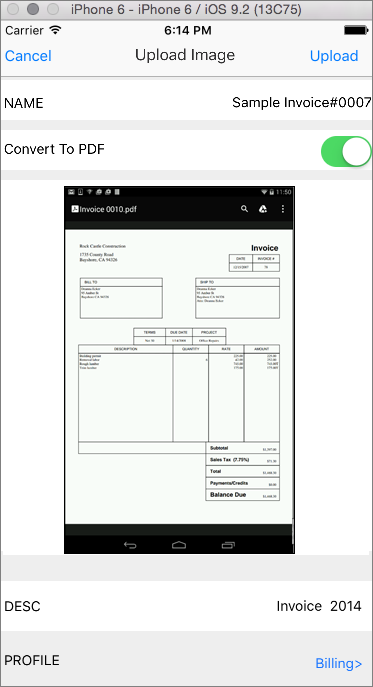
•Tap on the file name in-case you wish to rename the file.
•Enable Convert to PDF option to convert image files to PDFs. Files can be automatically converted into PDF on the server
when it is uploaded into Docsvault repository.
•Enter the optional file description.
•Profile file by entering necessary index values.
•In case of multiple files, swap to enter details for another file.
•Tap Upload button to add the file(s) to the repository. Alternatively, tap Cancel button at top to cancel and return to the home screen.
 |
Upload files from external apps using the 'Open In' feature
You can upload any files from other applications by using the "Open In" menu wherever it appears while sharing from other apps. For example, you can upload a file attached to an email or from your mobile explorer.
•When sharing document in external app, you should see an Open in option. From the listed apps, select Docsvault
•In the Docsvault navigation dialog that opens up, tap and go to the location to save the document to
•Tap Next button in the top-right corner of the screen to open the Import screen
•In Import screen, you can rename the file, enter description and profile the document being uploaded
•Click Upload button to upload the file in Docsvault repository
•If you have insufficient rights. Only users with "New File" right on any folder will be able to upload a new file within that folder. •If the file with the same file name already exists •Unable to connect to the server due to internet connection being interrupted |
