Sticky Note Tool
The Sticky Note Tool adds a Sticky Note wherever you need one for commenting.
Simply select the tool and a "sticky note cursor" appears. Place the cursor where you want the note and click it and a pop-up note appears:
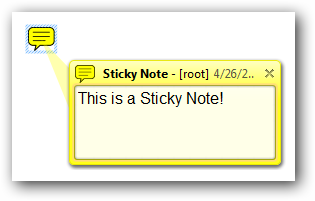 |
•You may move the note by clicking on the frame and dragging the note where you like.
•You may edit the pop-up note by clicking inside the light colored area and typing whatever text you like.
•You may click Ctrl-E to display the Sticky Note toolbar.
•You may also change the properties of the note by right-clicking inside the frame (yellow area in the example).