An external user with 'New Folder' rights on a shared folder can add a new folder anywhere under the permitted shared folders.
To add a New Folder
This procedure adds a new folder to your Docsvault repository (if allowed) under the currently selected folder
•Right click on relevant folder from the tree view or in an empty space inside any folder to add a new folder
•Click on New Folder in the pop up menu
•Enter Folder Name and Description for the new folder
•Select an appropriate Profile for the new folder and fill up its corresponding index values
•Choose Folder Section from the list if applicable
•Select the Icon of your choice for easy identification
•Click on Save button to create the folder
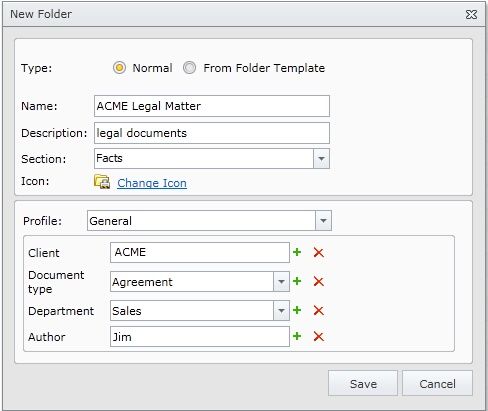 Creating a New Folder |
If any of your profile indexes consists of static list, the external user will be able to choose from that static list of values and hence your internal values may be exposed to the external users. If you prefer not to share this information with your users please ensure to set only those profiles on your shared folders that do not have static list indexes containing your confidential information.
|
