Audit Trail
Docsvault logs all user interactions with documents and can generate log reports on various criteria. Audit log is the complete history of selected activity being performed on a document inside Docsvault. It also logs activities performed by external users from the web portal.
Administrators or managers can view the audit log and identify each step performed on documents by any user.
You can apply predefined Audit trail settings on any cabinet, folder or file by selecting 'From Template', customize the setting or inherit from the parent folder.
To create an audit trail for a document:
•Right click on the selected cabinet/folder/file to open its context menu and then click on Properties.
•In Audit Settings tab, check the events to audit.
You can inherit audit permissions from the parent folder or can break an inheritance chain by customizing the settings. Customize option allows you to set the setting as per your requirement. You can save time by selecting predefined Audit trail settings From Template
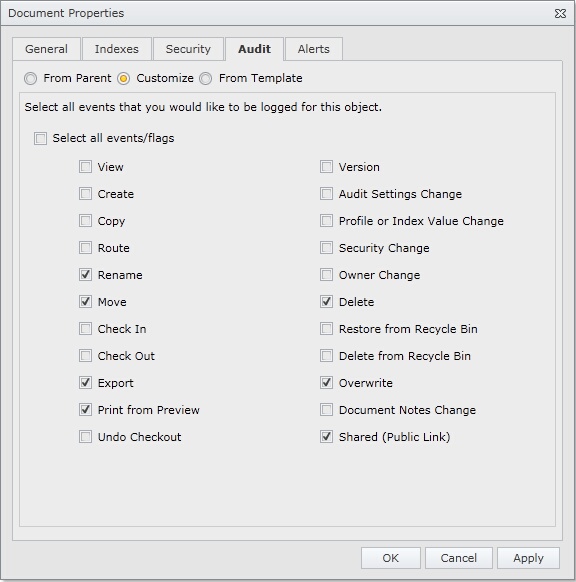 Audit Trail |
These records can then be queried by the administrator or authorized users to trace the events performed on documents.
Document Audit Trail
•Right click on the document to open its context menu and then click on Audit Trail to get the audit trail result for the selected document.
You can export this report in PDF and other formats for your records.
Advanced Audit Trail Query
•Click on the Tools icon on the top navigation bar and select Query Audit Trail to display Audit Trail dialog box
•To query for events occurring between 'specific dates',
oClick the check box next to Trail Date From to set the date range
•To query a list of actions performed by a particular user
oSelect the user name from the drop down box next to Filter by User
•To query for specific events
oSelect the event from the drop down box next to Events
•Specify the location to narrow the scope of the query
•Now click on Show Audit Trail button
•The audit log now logs activities performed by external users from the web portal
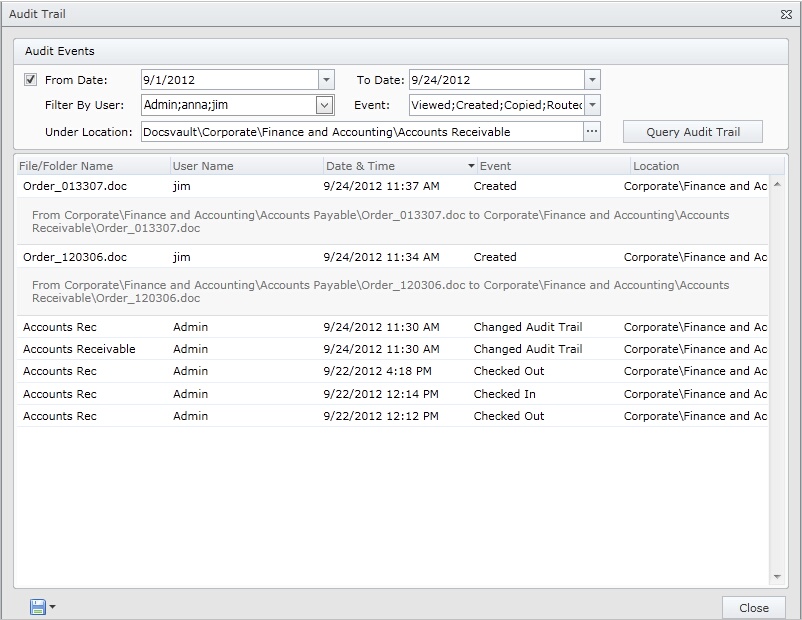 Advanced Audit Trail |