Current/Active Digital Certificates
The list under Current/Active node displays the validity period of the digital certificates issued to various users in the system.
|
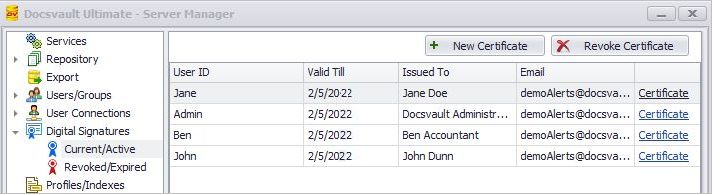
You can issue a new digital certificate for users by clicking on New Certificate button. Note that when a company certificate is changed, all users are automatically issued new corresponding certificates with renewed expiry date.
To create new certificate for a user
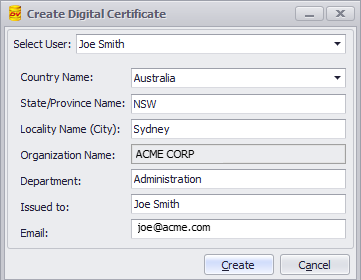
•Click the New Certificate button to open the new certificate form
•Select Docsvault User from the drop down list
•Enter optional information, such as contact details of the user: country, state/province, city and department
•The organization name, issued to and email address of the user are automatically filled up for the selected user. All fields except the Organization Name can be edited at this time before the user certificate is created.
•Click on the Create button to create a digital certificate for the user
 |
To revoke a digital certificate
To revoke and cancel Digital Signature rights for any user in the Docsvault system, select the user and click on Revoke Certificate button. The user's digital certificate gets revoked from that time onwards and is listed in Revoked/Expired list.
Revoked/Expired Digital Certificates
This list displays the date on which the digital certificate expired or was revoked. To view list of revoked and expired digital certificate users, go to Digital Certificate > Revoked/Expired node.