Document Profiles can be configured to automatically name and file documents in Docsvault based on rules set on index values. Auto-filing can work when importing and profiling a document from many places like the Drop Zone, Import Documents dialog, the Microsoft Office add-ins integration, right Profile panel, Document Properties dialog, the Scan interface, and the Filing Area. Documents are then auto named and filed into the appropriate folders based on predefined rules set in Filing Template of a Profile. This feature helps in maintaining consistent file names, reduce misfiling and makes bulk importing of documents very easy.
To automatically file documents from the Import Document dialog
•After Filing Template has been applied to any profile, Auto filing option would be enabled
•On choosing Auto option, all the available Profiles with auto-filing would be displayed in the drop-down list for selection.
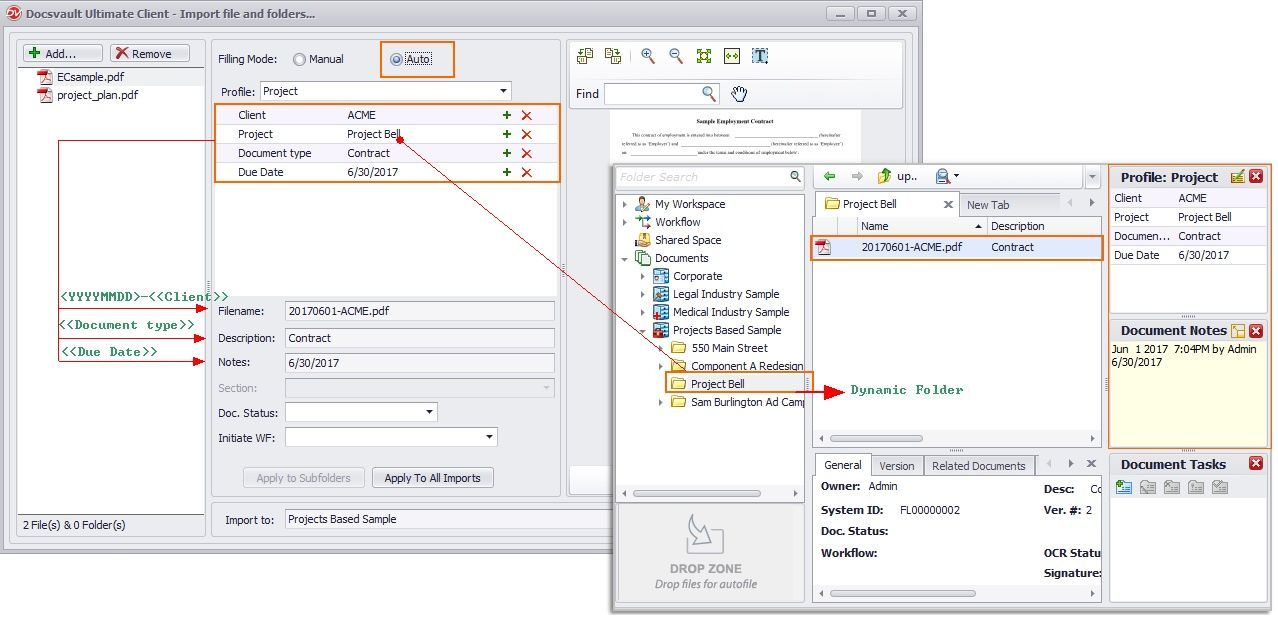
•As in the image below, when a user assigns profile to a file, the system will automatically detect/create a destination folder based on index values. This will also automatically name the file, add description and notes based on rules set in the Filing template of the selected Profile.
 |