Docsvault Forms has a built in simple analytics for each form that allows you to view form submission data visually. Your data is gathered and you will be able to analyze user behavior and statistics over time.
To check your form Analytics
•Go to the Form home page
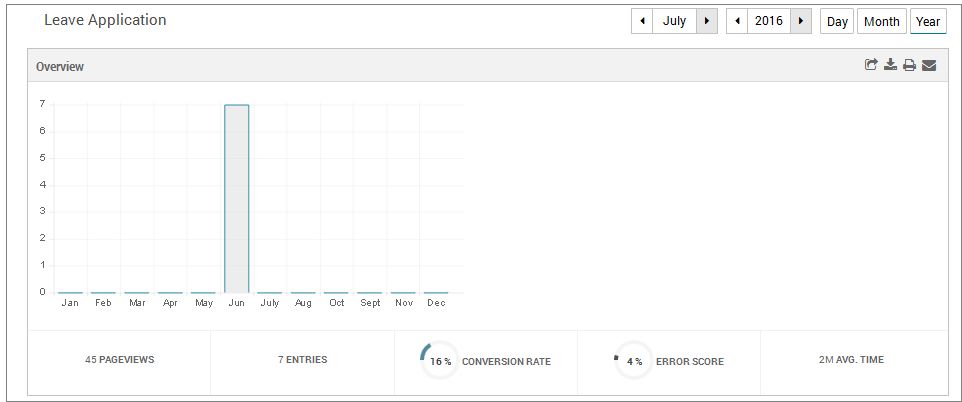
•Click on the Analytics link on your form. As the Analytics page loads, you will see the Overview on the form. This bar chart covers number of form entries.
•You can view the report by day, monthly or by year
•PageViews - Shows how many times your form was viewed
•Entries - Shows how many actual submissions were done
•Conversion rate - Shows the rate of conversion of views into entries. It is the value of Entries/Pageviews. A low conversion rate tells you that your view rate is high but the interaction is low. A higher conversion rate means you're getting the valuable information you need.
•Error Score - Shows the number of times that an error was thrown while your respondent tried to submit the form
•Avg, Time - Shows average time taken to fill up the form by your respondents
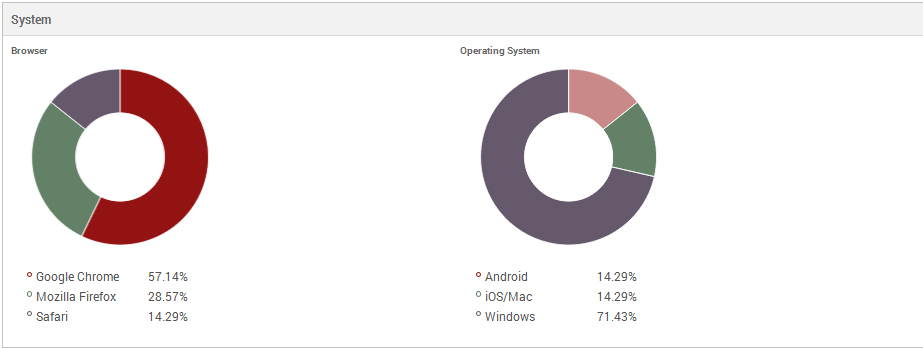
•The Technology platforms shows browsers and systems being used by your respondents while filling up the forms
  |