Adding Users using Active Directory Authentication
If you have a domain based network and would like your AD users to use their windows user names and password in Docsvault too, you will need to use the Active Directory authentication method. Active Directory Integration allows seamless login of specified active directory users into the Docsvault system.
Enable Active Directory Settings First
•Select User/Group node in Docsvault Server Manager
•Click on the AD Settings option
•Select the check box next to 'Enable Active Directory Integration' to enable Active Directory integration
•Input the AD information, and a AD administrator username and password to establish a connection with the Active Directory. Once the information is set, click Save
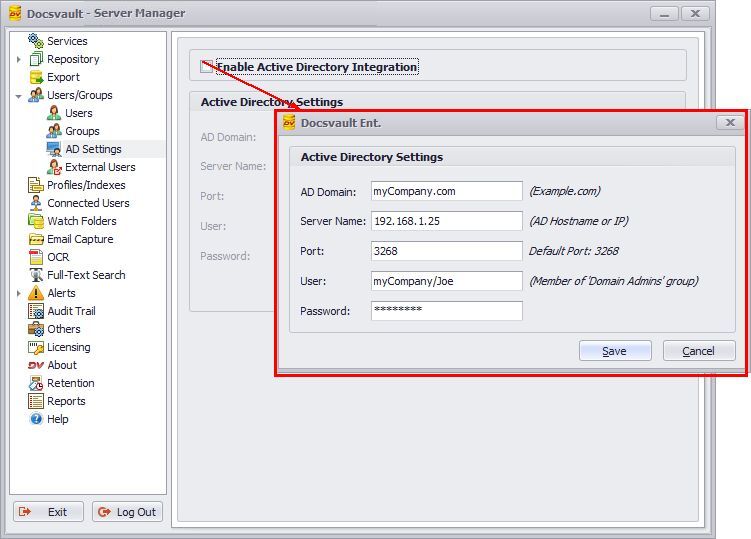 Active Directory Settings |
To import users from Active Directory into Docsvault
•Select User/Group > Users node in Docsvault Server Manager
•Under AD Users tab, click on Add button to add a user to the Docsvault database
•Select users in the list to be added
•Check mark the Groups and the System Rights to assign to selected users
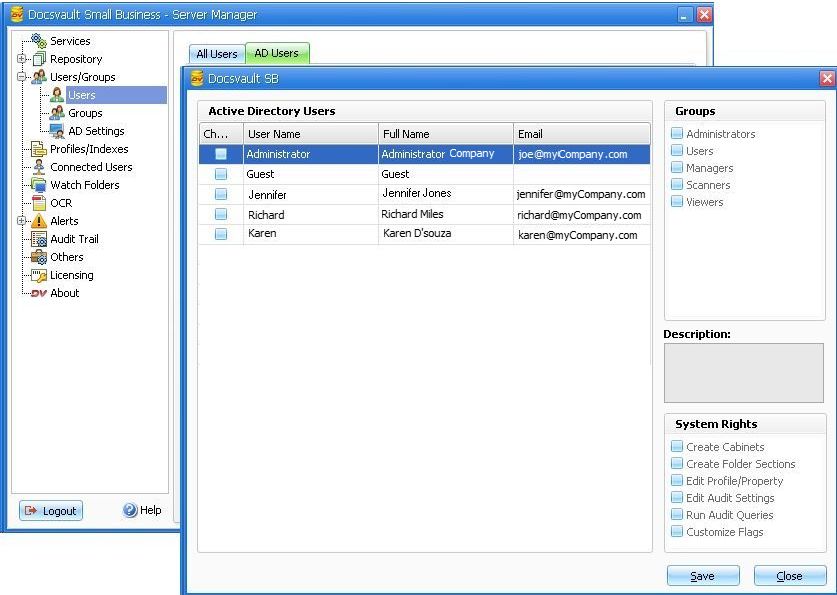 Adding Active Directory Users |