Integrate Docsvault with Windows Explorer
Docsvault is seamlessly integrated into Windows Explorer ‘Open’ and ‘Save As’ dialogs. In addition to the File > Open/Save dialog integration, Docsvault also appears under ‘My Computer’ in Windows Explorer where users can drop files and folders to import them into Docsvault.
This new feature brings:
Seamless Integration with Desktop Applications
The Windows Explorer File Open/Save dialog provides instant access to Docsvault storage directly from any Windows desktop application that uses ‘File > Open/Save’ dialogs. This means that you can now interact with the Docsvault repository right from any application.
Drag-and-Drop facility using Drop Folder under ‘My Computer’
Complete folder structures can be copied from the desktop into Docsvault repository with a simple drag-and-drop operation. The necessary folders are created in Docsvault, files are imported, and indexes values can be set on each file imported
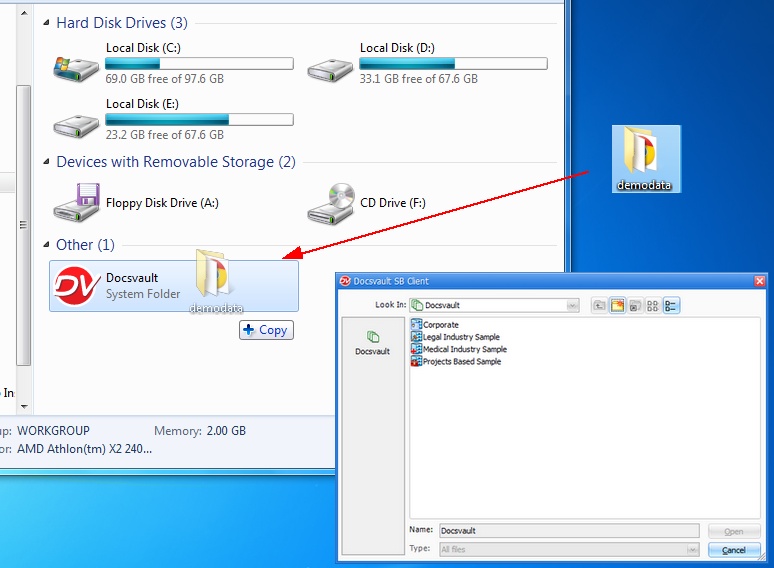 Integration with Windows Explorer |
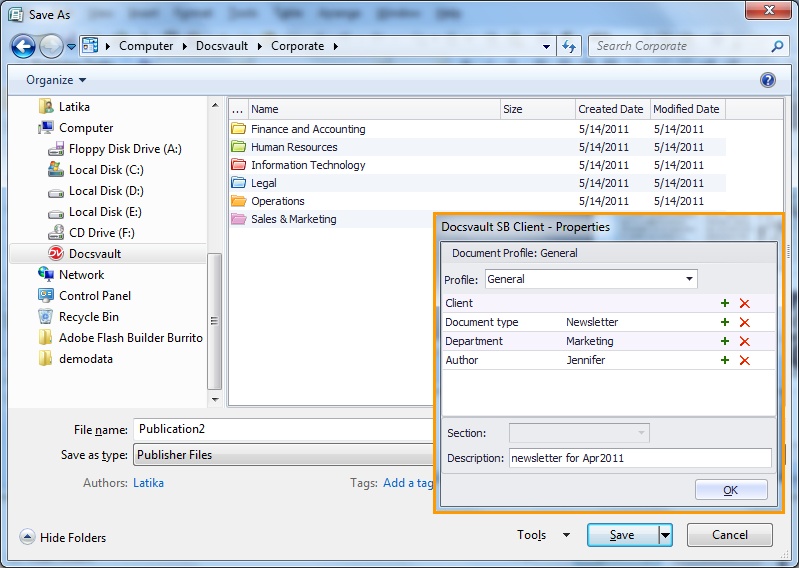 Windows File Open/Save As |
To display Docsvault in the tree view (left panel) of Windows 7 Open/Save dialogs, you might need to do the following:
|
