This feature is available only in Docsvault Enterprise & Ultimate Editions
|

Export Repository
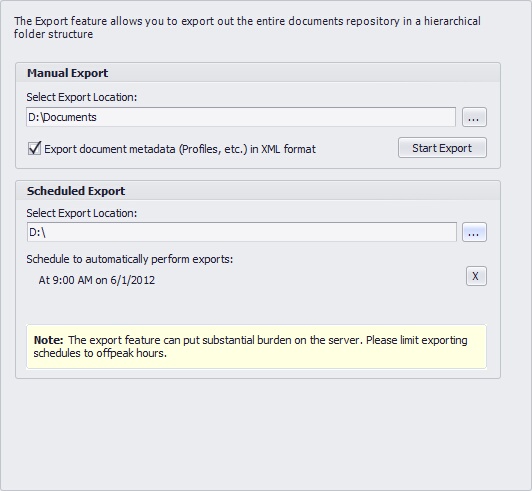
You can directly export the entire documents repository to any local or network location. Unlike data backup, the Export Repository feature allows you to make a direct one-to-one copy of the document database with original file and folder names in a hierarchical folder structure.
Manual Export
This option allows you to export the entire document repository. Select the location to export the files in their native format.
Export document metadata (profiles, etc) in XML format
Select this option to include the meta data like profile values, descriptions, document notes while manually exporting the repository.
 Export Repository |
Scheduled Export
You can even schedule the export operation to run automatically at set interval.
Select Export Location:
Specify the file system path where the documents are to be exported and then set the schedule for automatic export.
Set Schedule for Automatic Exports:
•Click on the Set Schedule button. Docsvault will ask for your Windows' user name and password in Windows Login Information dialog box.
•In the Windows Schedule dialog box, set the date, time, and frequency parameters for the export.
•When you are finished, click the OK button.
Doing this creates a export task that is executed at the predefined schedule.
To delete the export scheduled task, simple click on the delete ( X ) button.
- This utility is not a two way sync - i.e. it will simply dump files from the repository to the export location. So if you delete or move a file inside Docsvault it will not be deleted/moved in the exported location but a moved file will be reexported at the new location too.
- You will need to check the size of the export folder from time to time as it will keep growing in size as new files are added (and old ones are not deleted). You may choose to delete the export folder (or rename it) and the entire CURRENT repository will be created again during the next run.
- Versions of files are also exported and are appended with _v#. However the latest file is always the one without the v# suffix at the exported location.. |